
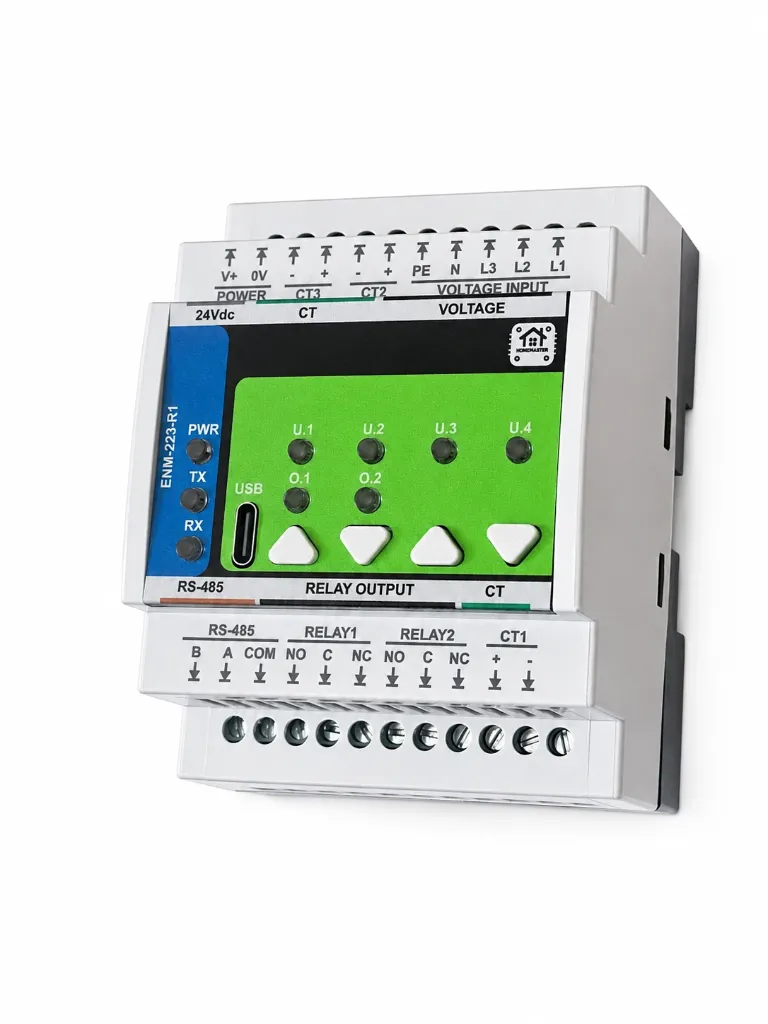
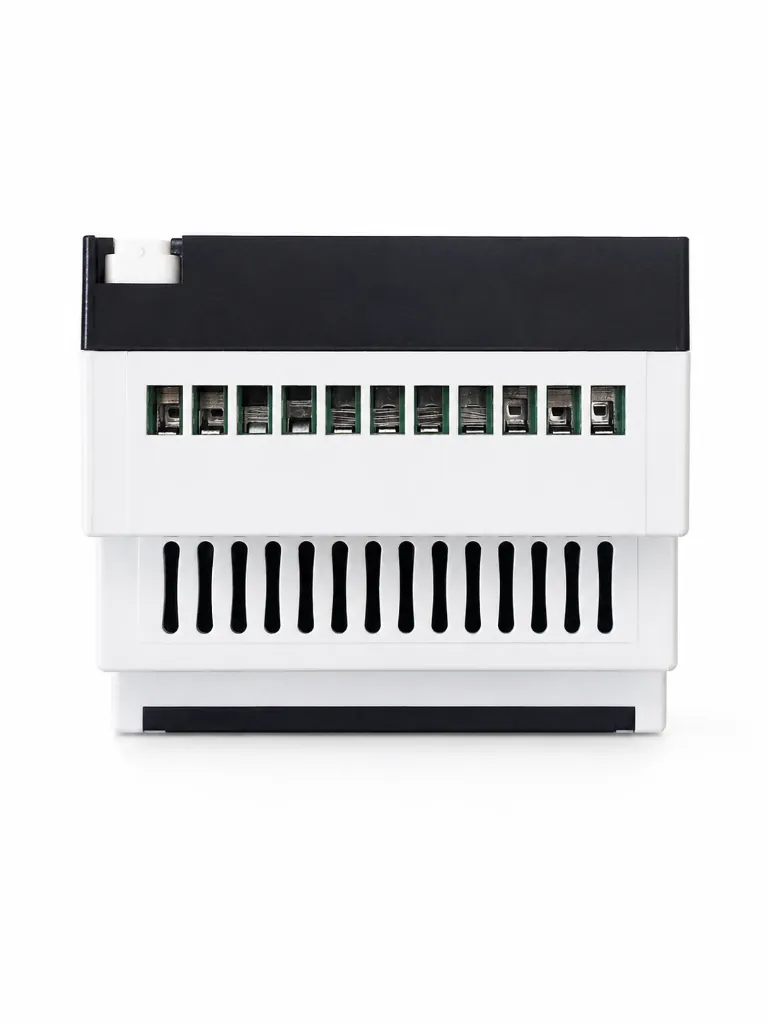
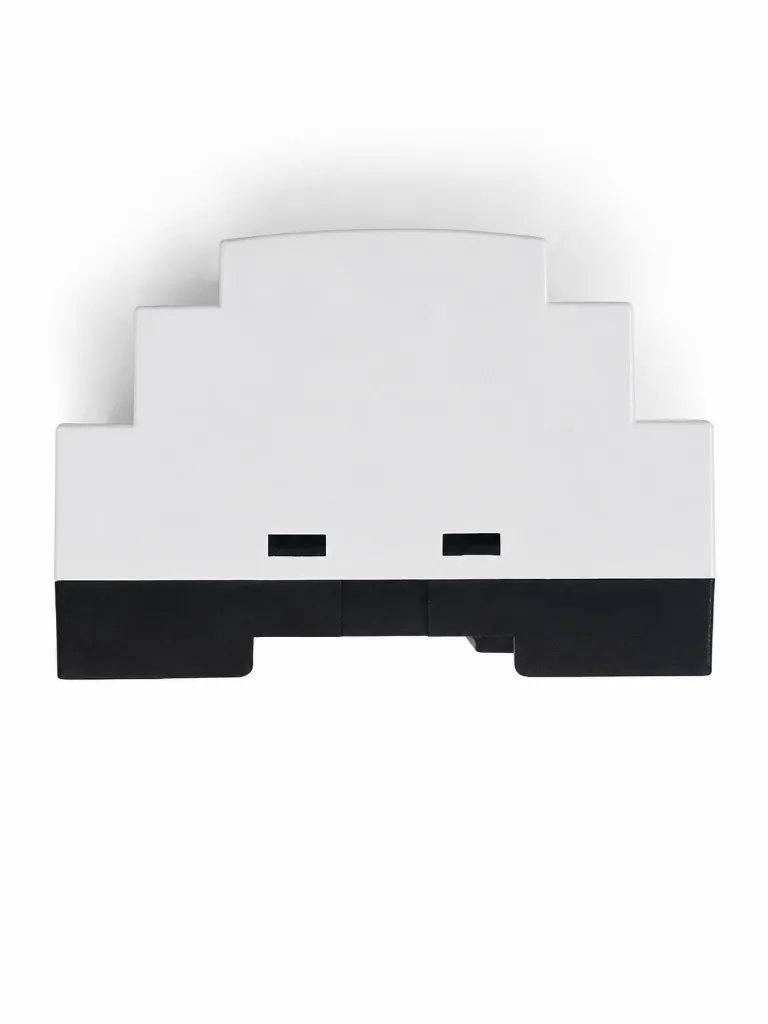
Three-phase energy meter for Home Assistant and ESPHome
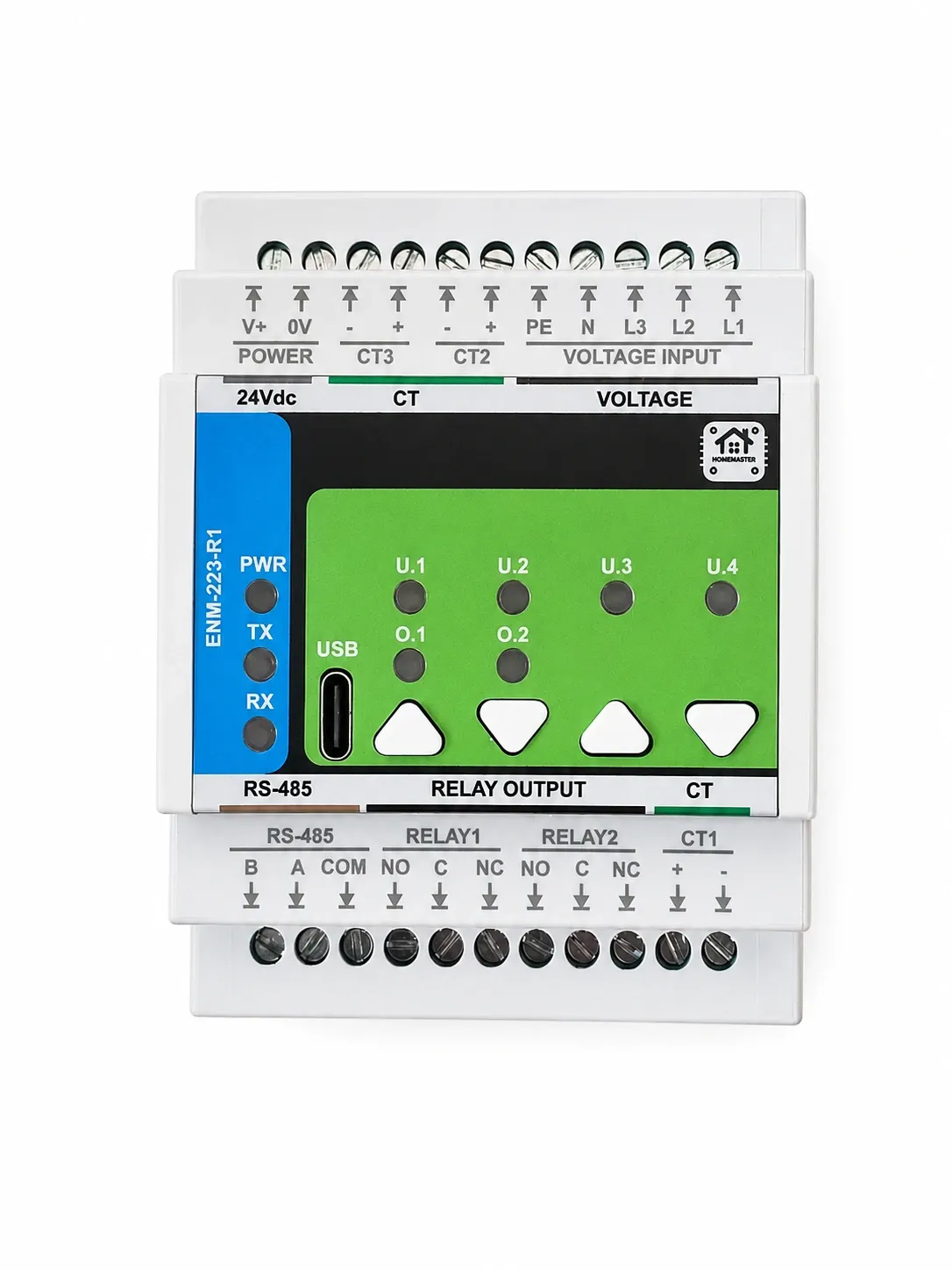
The HomeMaster ENM-223-R1 is a DIN-rail three-phase energy meter for a wired smart home running Home Assistant. It measures three voltage channels (L1/L2/L3-N, 85–265 V AC) and three current channels through external CTs on an ATM90E32AS metering front end, and it is a Modbus RTU slave on RS-485 — so an ESPHome energy monitor built on it needs no cloud account, no MQTT broker and no vendor gateway. On a heat-pump circuit the same CT channels show the pump's real three-phase consumption so Home Assistant can shed other loads to stay inside the supply limit.
Read the CT requirement before ordering clamps: the module takes current-output CTs with a secondary of 60 mA RMS or less, into a 6 Ω on-board burden, full scale 120 / 60 / 30 mA at PGA ×1 / ×2 / ×4. Voltage-output clamps of the 333 mV or 1 V class do not work here, and a 1 A or 5 A secondary CT will destroy the module. Two SPDT relays are driven by thresholds evaluated on the module itself, so a load-shedding rule keeps working when the controller or the Home Assistant server is unavailable.
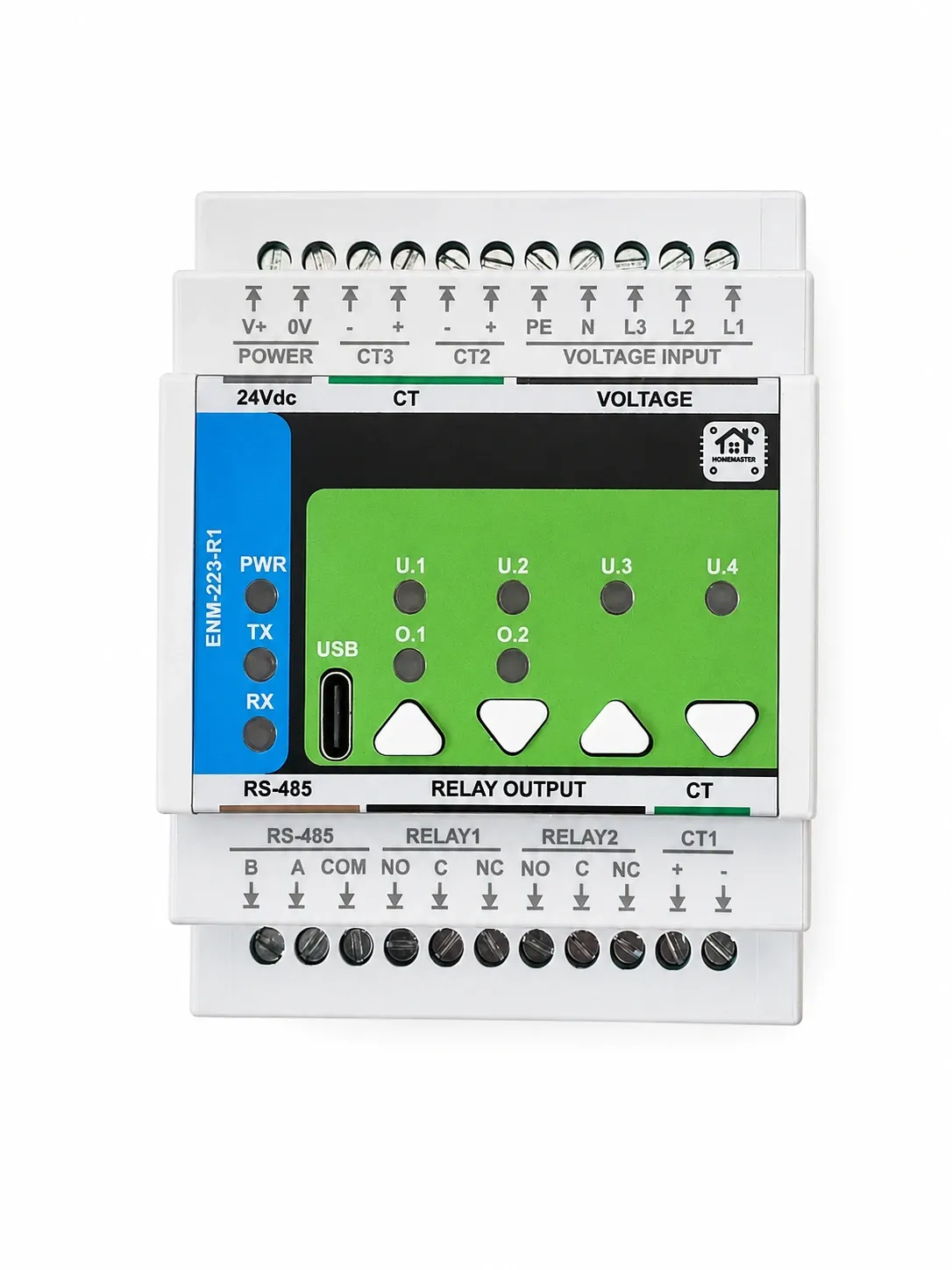
The HomeMaster ENM-223-R1 is a DIN-rail 3-phase energy metering and I/O module for power monitoring and automation. It measures 3 voltage channels (L1/L2/L3-N) and 3 current channels via external CTs, and provides 2 SPDT relay outputs for alarm or control.
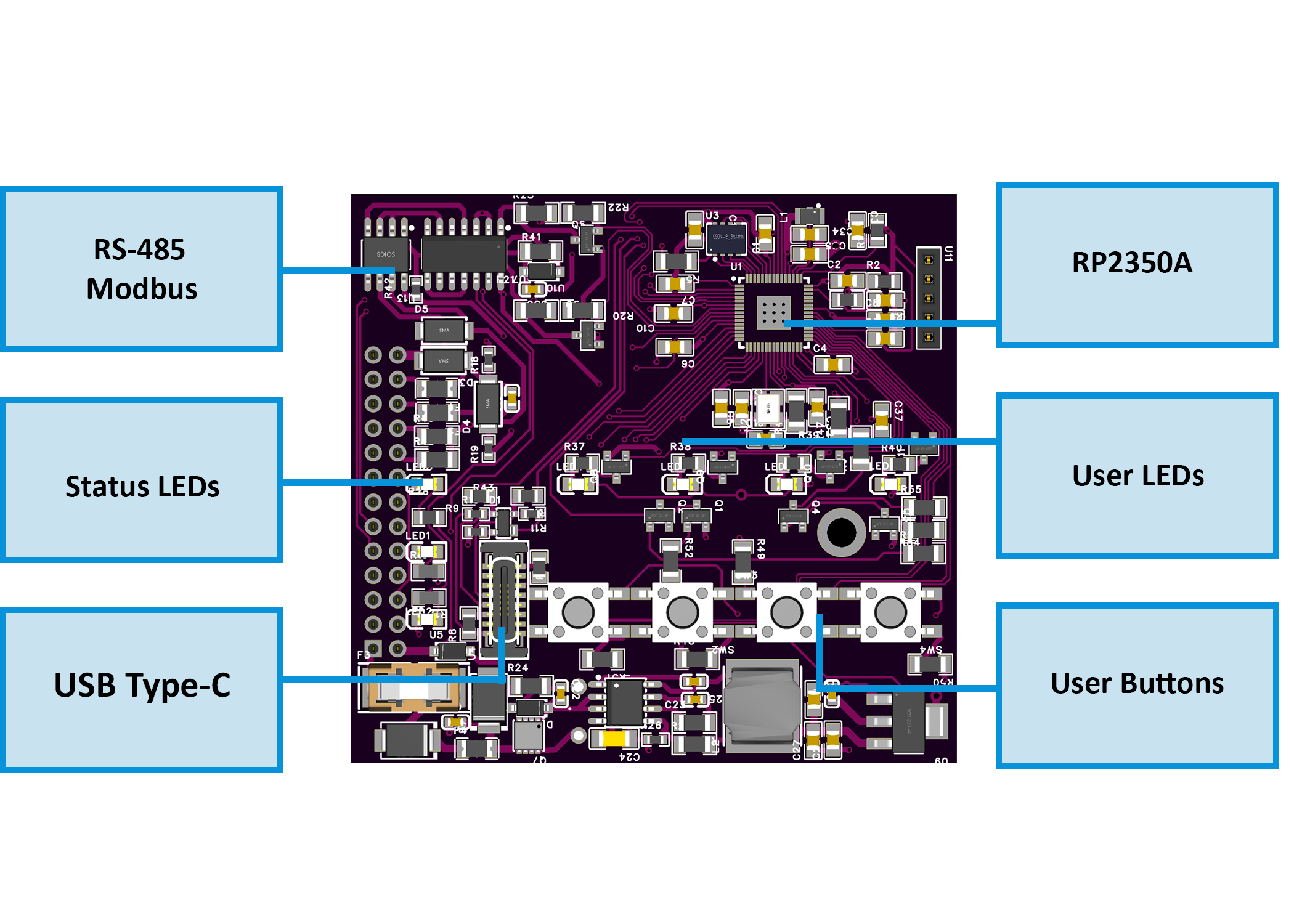
The module communicates as a Modbus RTU slave over RS-485 and is configured via USB-C WebConfig (Web Serial). Configuration and logic settings are stored persistently in onboard memory.
Through a MiniPLC or MicroPLC running ESPHome, the module appears in Home Assistant over the native ESPHome API — no MQTT broker, no Modbus register mapping in Home Assistant and no custom converters. Entities are ready to use within seconds, with low latency and no cloud.
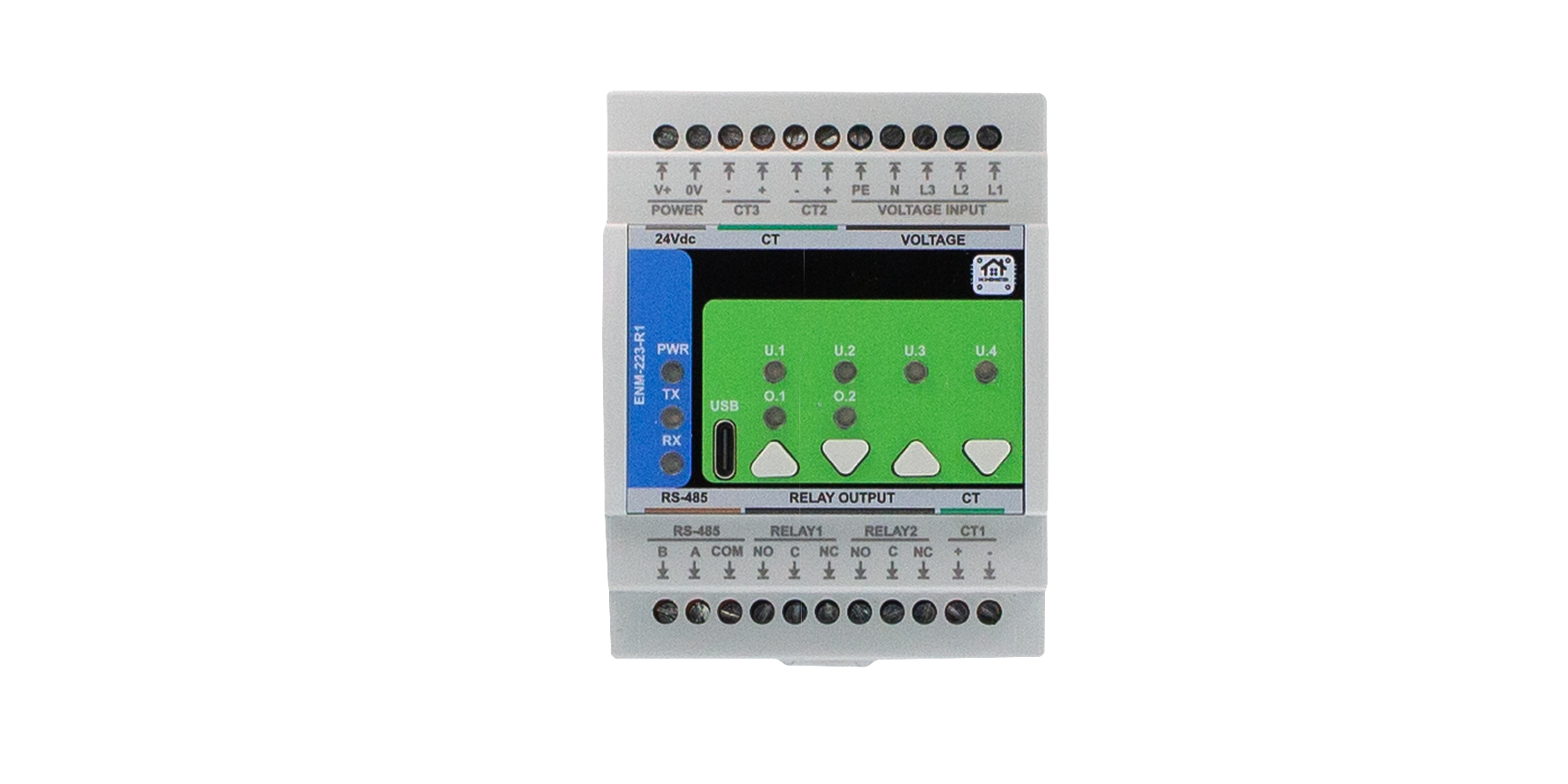
Quick Overview
- 3-phase energy metering + relay control module for automation
- DIN-rail form factor with 24 V DC supply
- Voltage sensing: L1/L2/L3-N (mains measurement)
- Current sensing: 3 external CT channels
- 2 × SPDT dry-contact relays for alarms or load control
- RS-485 Modbus RTU multi-drop communication
- Local configuration via USB-C WebConfig
- Optional alarms/warnings/events with button/LED feedback
Over Modbus the module reports RMS voltage on L1, L2 and L3, RMS current on L1, L2, L3 and the neutral, line frequency, and temperature. Active, reactive and apparent power are given per phase and as a total, together with power factor per phase and total and the voltage–current angle on each phase. THD is reported per phase. Active and reactive energy accumulate as import and export, per phase and as a total. Flags mark sag, overvoltage, phase loss, overcurrent, a frequency event and reverse phase sequence.
Typical Applications
- Energy dashboards and building energy monitoring
- Overcurrent / power-quality alarm triggering
- Demand response / staged load shedding
- HVAC and electrical cabinet power supervision
- SCADA / PLC metering input expansion
- Home Assistant via ESPHome on the controller
- Heat pump consumption monitoring
- Load shedding within a supply limit
Tech Specs
| Specification | Details |
|---|---|
| Microcontroller | RP2350A dual-core microcontroller |
| Metering IC | ATM90E32AS (3-phase energy metering / power quality) |
| Storage | External QSPI Flash (W25Q32JV) |
| Power Input | 24 V DC nominal (V+ / 0V) with protection (reverse polarity diode, TVS, EMI filtering) |
| Voltage Inputs | 3 × L1/L2/L3-N + PE sensing, 85–265 V AC (mains measurement inputs) |
| Current Inputs | 3 × CT channels (external current-output CTs); secondary ≤ 60 mA RMS into a 6 Ω on-board burden. Full scale 120 / 60 / 30 mA at PGA ×1 / ×2 / ×4 (default ×2). Do not use 1 A or 5 A secondary CTs. |
| Measured quantities | RMS voltage L1/L2/L3 (V), RMS current L1/L2/L3 and neutral (A), active / reactive / apparent power per phase and total (W, var, VA), power factor per phase and total, line frequency (Hz), voltage–current angle L1/L2/L3 (°), THD L1/L2/L3 (%), active and reactive energy import/export per phase and total (Wh, varh), temperature (°C), sag / overvoltage / phase-loss / overcurrent / frequency / reverse-phase-sequence flags |
| Relay Outputs |
2 × SPDT dry-contact relays (NO / COM / NC). Rated load (system limit): 3 A @ 250 V AC (resistive contact rating). Max load: 750 VA @ 250 V AC, 90 W @ 30 V DC. Relay outputs are not internally fused; external overcurrent protection is required. |
| RS-485 | RS-485 Modbus RTU (MAX485, half-duplex), non-isolated; TVS surge protection, PTC fuses, common-mode choke, fail-safe biasing |
| USB | USB-C (ESD protected), configuration and firmware upload |
| File System | LittleFS persistent configuration storage |
| User Interface | 4 buttons; 9 LEDs (power, 4 user LEDs, RX, TX, relay status) |
| Modbus Address Range | 1–247 (default is configurable; typically 3) |
| Modbus Baud Rate | 9600–115200 (default: 19200, 8N1) |
Installation, Environmental & Mechanical
| Category | Specification | Details |
|---|---|---|
| Terminal Specifications | Terminal type | Pluggable screw terminal blocks, 5.08 mm pitch |
| Terminal pitch | 5.08 mm | |
| Wire cross-section | 0.2–2.5 mm² (AWG 24–12) | |
| Conductor type | Solid or stranded copper | |
| Stranded wire | Ferrules recommended | |
| Tightening torque | 0.4–0.6 Nm | |
| Environmental Ratings | Operating temperature | 0 °C to +40 °C |
| Storage temperature | −10 °C to +55 °C | |
| Relative humidity | 0–90 % RH, non-condensing | |
| Ingress protection | IP20 (inside cabinet) | |
| Maximum altitude | 2000 m | |
| Pollution degree | 2 | |
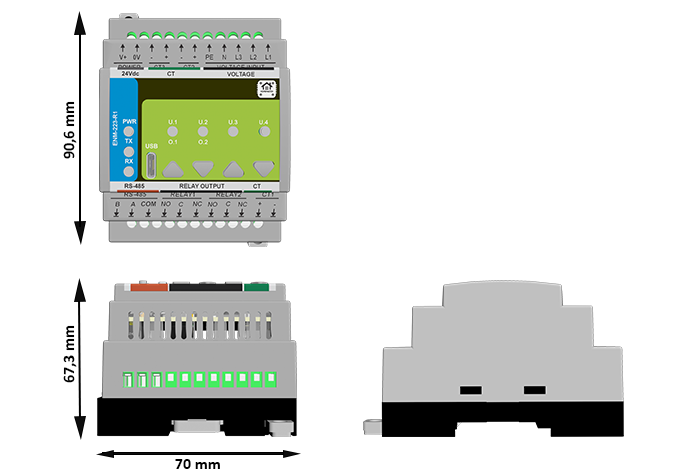
| Mechanical & Packaging | Product dimensions | 71.5 × 90 × 59 mm (L × W × H) |
| DIN width | 4 modules (4 × 17.5 mm) | |
| Mounting | 35 mm DIN rail (EN 50022) | |
| Enclosure | PC/ABS industrial enclosure (UL94-V0) | |
| Net weight | TBD | |
| Gross weight | TBD | |
| Pack size | 140 × 125 × 94 mm (L × W × H) |
Install only inside a control cabinet with ventilation; the cabinet must include a protective front plate covering all module connection terminals and a closing protective door; not for outdoor or exposed installation.
All wiring terminals must be protected against accidental contact by an insulating front plate, wiring duct, or terminal cover. Exposed live terminals are not permitted.
Home Assistant / Modbus / Web Config Integration
The ENM-223-R1 supports flexible integration with:
- HomeMaster MicroPLC and MiniPLC controllers
- PLC and SCADA systems via Modbus RTU
- Home Assistant using ESPHome (controller side) or a Modbus integration
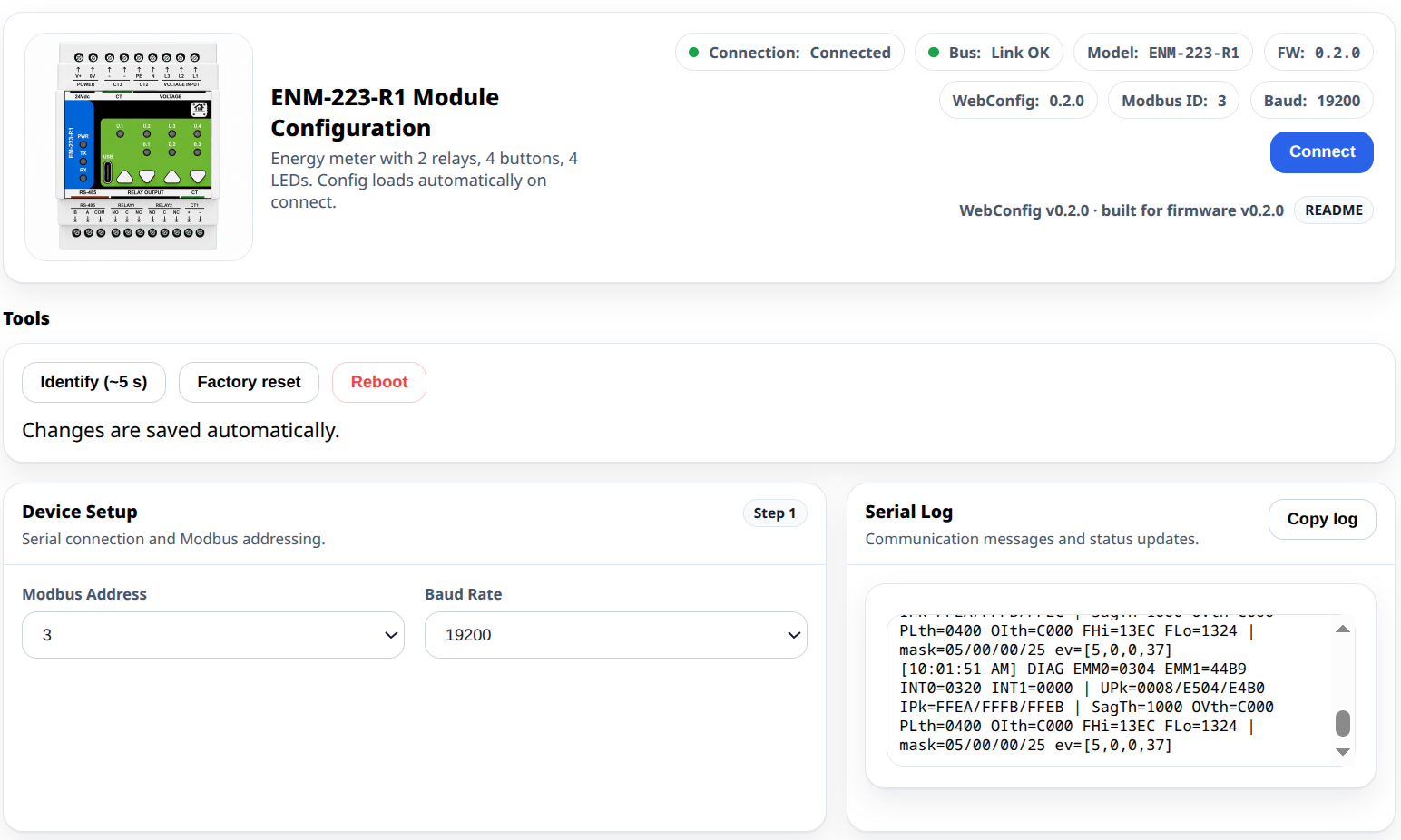
- Direct USB-C configuration using browser-based WebConfig
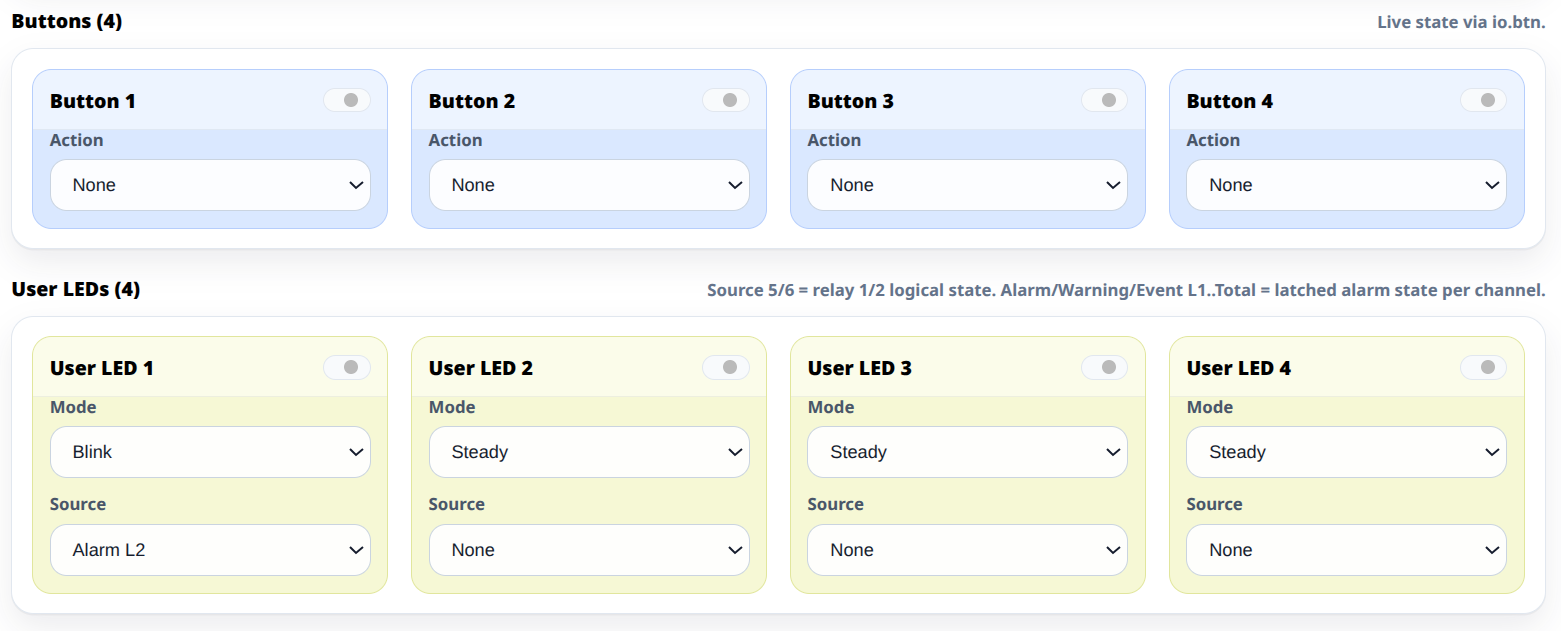
Configuration (metering options, calibration/offsets, alarms, relay modes, LED/button mapping) is saved persistently and restored at power-up.
Quick Setup Process (USB-C WebConfig)
- Mount & Power – Install on DIN rail and connect the 24 V DC supply.
- Connect USB-C – Connect USB-C cable to the module.
- Open WebConfig – Open WebConfig in Chrome/Edge.
- Connect Device – Click Connect and select the serial device.
- Configure Modbus – Set Modbus address and baud rate.
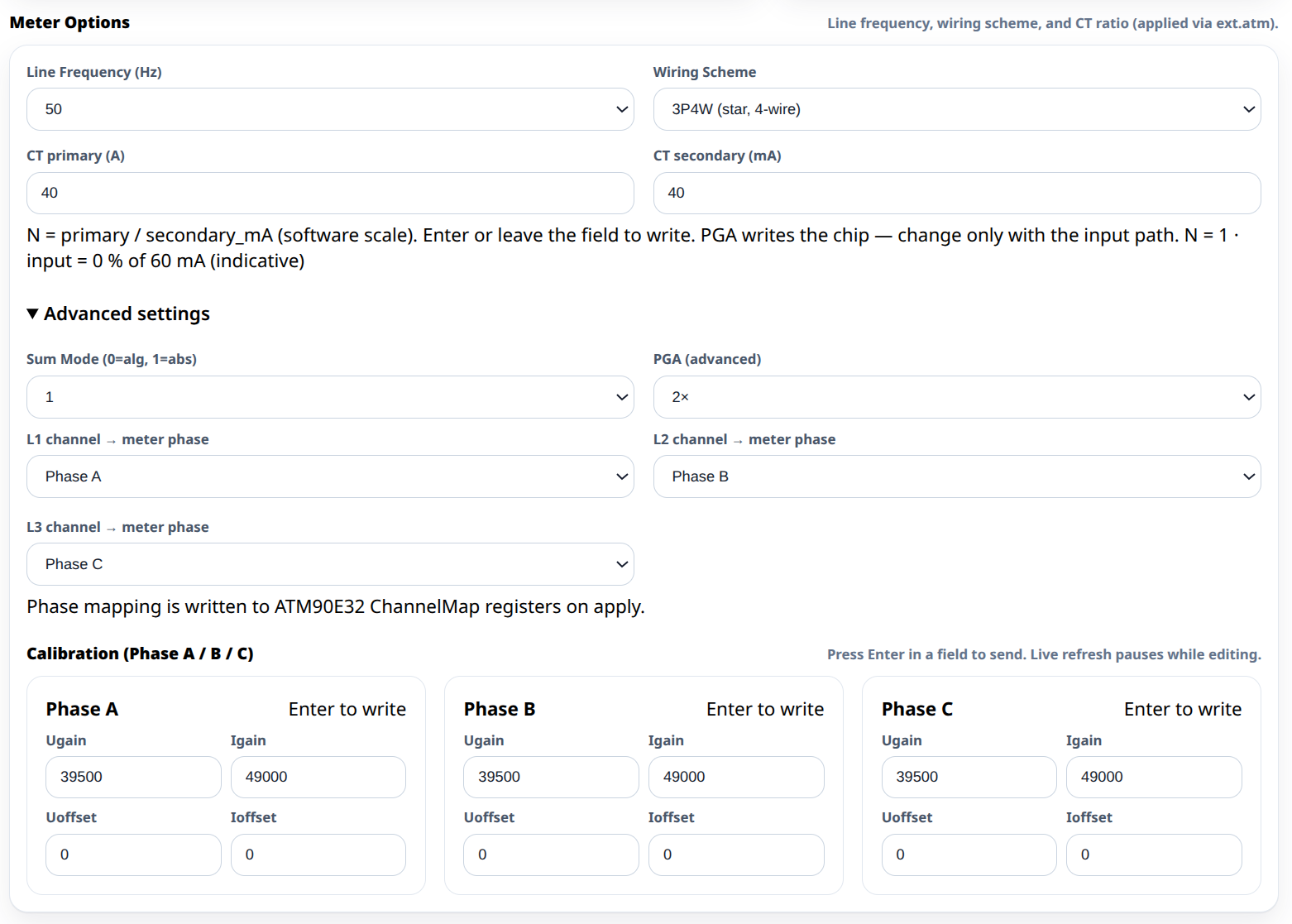
- Meter Calibration & Alarms – Select line frequency, scaling, and thresholds per phase.
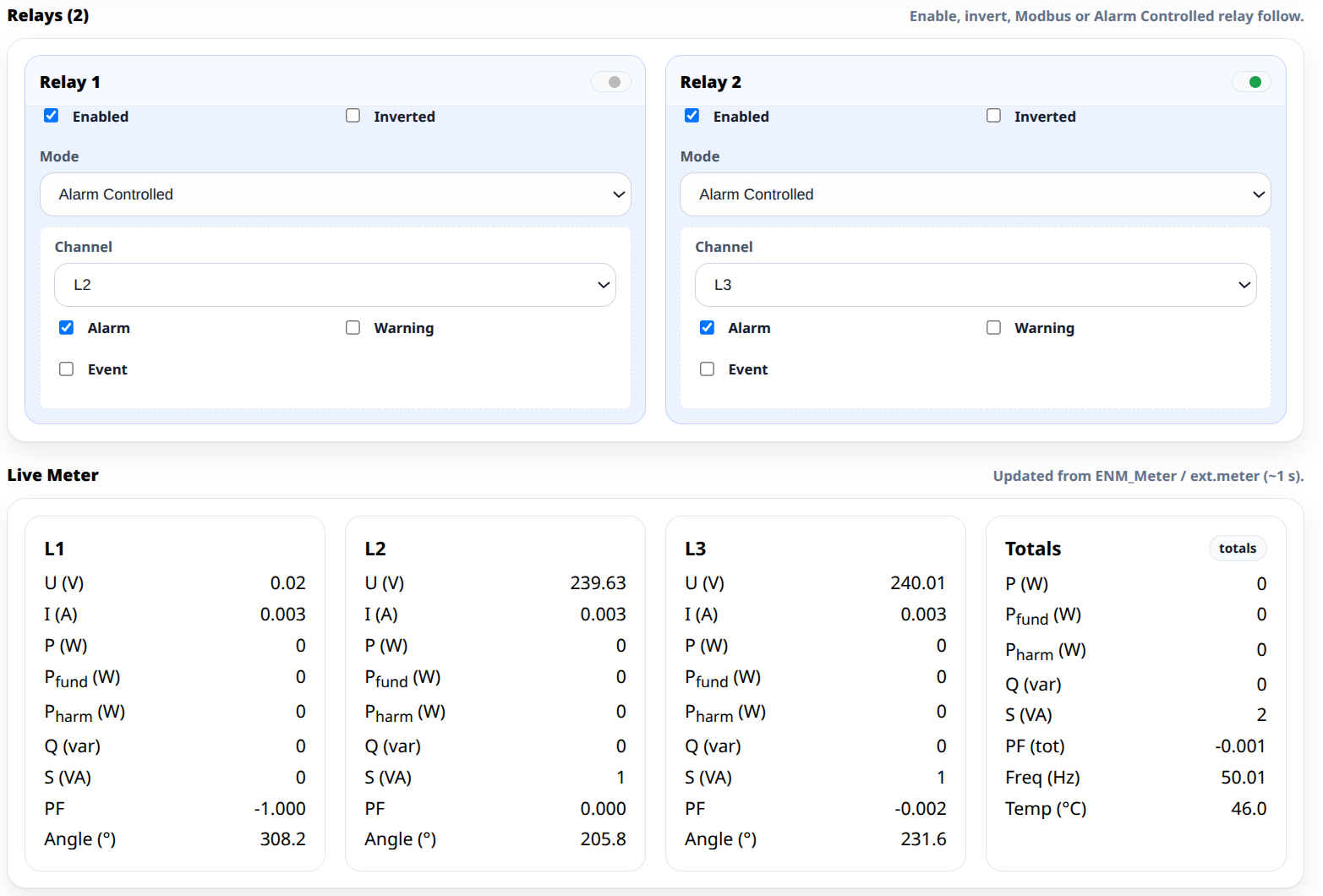
- Map Relays/LEDs/Buttons – Choose relay control mode and alarm/ack behavior.
- Save & Disconnect – Save settings and disconnect USB-C for field operation.
Typical WebConfig options:
- Modbus address (1–247) and baud rate (9600–115200)
- Line frequency (50/60 Hz) and metering sum mode
- Per-channel gains/offsets (U/I calibration)
- Alarm / warning / event thresholds with optional acknowledgment behavior
- Relay control modes (alarm-controlled or Modbus-controlled) and inversion
- User LED sources (alarms/warnings/events/overrides)
WebConfig provides live meter values and configuration settings (stored persistently).
Minimal ESPHome YAML (Controller side)
Use this on the MiniPLC/MicroPLC (ESPHome). It enables the RS-485 bus and imports the ready-made ENM package.
uart:
  id: uart_modbus
  tx_pin: 17
  rx_pin: 16
  baud_rate: 19200
  parity: NONE
  stop_bits: 1

modbus:
  id: modbus_bus
  uart_id: uart_modbus
  turnaround_time: 100ms
  send_wait_time: 250ms

packages:
  enm1:
    url: https://github.com/isystemsautomation/homemaster-dev
    ref: main
    files:
      - path: ENM-223-R1/Firmware/v0.2.0/default_enm_223_r1_plc/default_enm_223_r1_plc.yaml
        vars:
          enm_prefix: "ENM #1"
          enm_id: enm_1
          enm_address: 3 # Modbus address set in WebConfig
    refresh: 1d
ESPHome 2026.7.0 raised the Modbus client defaults —
turnaround_timefrom 100 ms to 600 ms andsend_wait_timefrom 250 ms to 2000 ms (PR #11969).At the 600 ms default the bus carries only about 1.5 Modbus transactions per second, whatever the UART speed, because the controller stays silent for 600 ms after every response. Two modules on one RS-485 bus become slow to respond. With three or more, one module can stop being polled altogether — with no timeout and no CRC error in the log.
On ESPHome 2026.7.0 and newer, set both values explicitly as shown above. On earlier releases these were the defaults and the two lines are not required.
`enm_address` must match the Modbus address configured in WebConfig.
Full Modbus register mapping and advanced integration details are available in the ENM-223-R1 README.
The module needs a Modbus master on the bus. In a HomeMaster system that is the MiniPLC or the MicroPLC — both run ESPHome and connect to Home Assistant over the native API. To work out how many modules a panel needs and how wide it comes out, use the System Builder.
Current transformers, heat-pump circuits and load-shedding targets are sized from the installation drawing — the meter reports what those circuits draw; it does not ship with CTs or prescribe which loads to disconnect.
New to this kind of system? Two guides cover the ground: building a Home Assistant automation system and a wired ESPHome smart home.
Going deeper on this module: monitoring more circuits than your panel has room for and wiring a new house before the walls close. Related modules: the MicroPLC and the OpenTherm Gateway.
Frequently asked questions
Which current transformers do I need?
Current-output CTs with a secondary of 60 mA RMS or less, working into the 6 Ω burden on the board. Full scale is 120, 60 or 30 mA depending on the PGA setting (×1, ×2 or ×4; default ×2), which is how the CT ratio is matched to the circuit being measured. Do not fit voltage-output clamps of the 333 mV or 1 V class — they are a different device class and will read wrong. Do not fit 1 A or 5 A secondary CTs: they will destroy the module. Never open a live CT secondary.
How does it get into Home Assistant?
Through a Modbus master on the RS-485 bus. In a HomeMaster system that is the
MiniPLC or the
MicroPLC running ESPHome, which exposes the
readings to Home Assistant over the native ESPHome API. No MQTT broker and no
hand-written register map. On ESPHome 2026.7.0 and later, set
turnaround_time and send_wait_time explicitly — the
defaults changed in that release and a Modbus bus tuned for the old values will
time out.
Can it cut a load off by itself?
Yes, within its two relay channels. Thresholds, alarm and warning events and the acknowledgement behaviour are configured in WebConfig and evaluated on the module, and a relay can be set to alarm-controlled instead of Modbus-controlled. That rule keeps running with the bus master offline. Relay rating is 3 A at 250 V AC resistive as a system limit, 750 VA at 250 V AC or 90 W at 30 V DC maximum; the outputs are not internally fused, so fit external overcurrent protection, and switch anything heavier through a contactor.
Can I bill a tenant from these readings?
No. The module is not a certified revenue meter and carries no MID approval, so its figures are for monitoring, diagnostics and automation, not for settlement or resale. Where a reading has to hold up commercially, a certified meter is required and this module sits alongside it.
Is it single-phase compatible?
Yes — populate one voltage channel and one CT channel and leave the others unused. Line frequency is selectable between 50 and 60 Hz in WebConfig, along with the metering sum mode and per-channel gain and offset calibration.
Do I have to use HomeMaster controllers?
No. The module is a standard Modbus RTU slave on RS-485, address 1–247 and baud 9600–115200 (default 19200, 8N1). Any Modbus master reaches it: a third-party PLC, a SCADA system, or your own ESP32 with an RS-485 transceiver.
Is the RS-485 port isolated?
No. It has transient protection — TVS diodes, resettable PTC fuses and fail-safe biasing — but that is surge protection, not galvanic isolation; the transceiver shares the device's logic ground. Run COM to every node on the bus, and fit an external RS-485 isolator where the bus crosses into a separate electrical installation with its own earthing reference.
How is it configured?
Over USB-C from a browser using WebConfig — Web Serial, no driver and no vendor application. Modbus address and baud rate, line frequency, per-channel gain and offset, event thresholds, relay modes and LED sources are set there and stored in on-device flash (LittleFS).
Documentation
The ENM-223-R1 is open-source hardware. Hardware and firmware files are available.
Hardware Design Files
| File | Description | Link |
|---|---|---|
| Field Board Schematic | Voltage sensing and CT front-end | ENM-223-R1-FieldBoard.pdf |
| MCU Board Schematic | Controller, RS-485, USB, power conversion | ENM-223-R1-MCUBoard.pdf |
| Relay Board Schematic | Relay output stage | ENM-223-R1-RelayBoard.pdf |
Compliance Documents
| File | Description | Link |
|---|---|---|
| EU Declaration of Conformity (DoC) | Signed EU Declaration of Conformity per Reg. (EC) 765/2008 and Decision 768/2008/EC | DoC_ENM-223-R1.pdf |
| Datasheet | Technical specifications and electrical characteristics | ENM-223-R1_Datasheet.pdf |
Firmware & Software
| Resource | Description | Link |
|---|---|---|
| Firmware Source Code | Firmware and configuration tools | GitHub repository |
| Integration Guide | Setup and configuration documentation | README.md |
| WebConfig Tool | Browser-based configuration interface | Built-in USB interface |
Connectors & terminal map
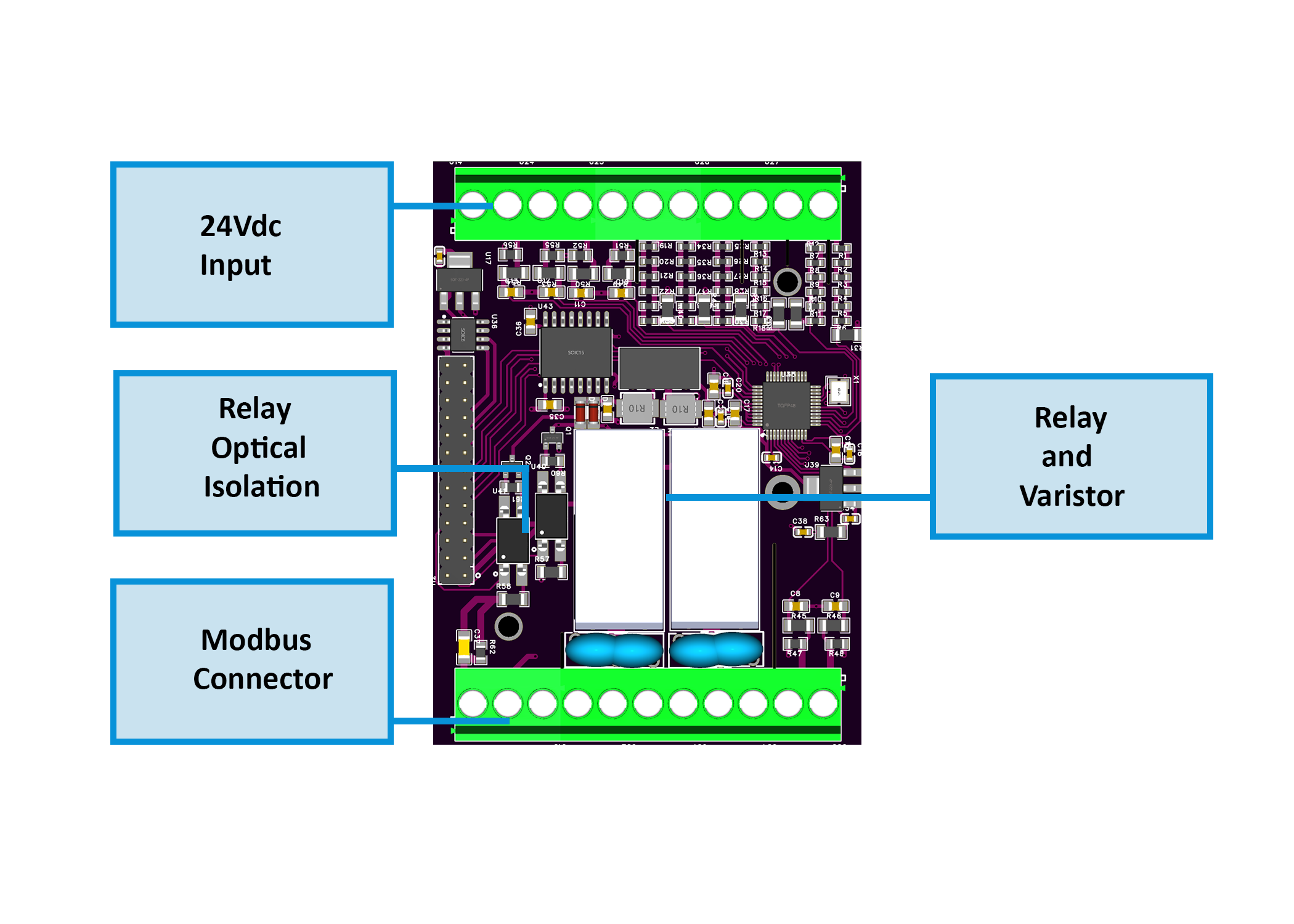
Top row (24Vdc | CT | VOLTAGE)
| Pos | Label | Group | Function |
|---|---|---|---|
| 1 | V+ | POWER | 24 V DC input |
| 2 | 0V | POWER | 24 V DC return |
| 3 | - | CT3 | CT3 negative |
| 4 | + | CT3 | CT3 positive |
| 5 | - | CT2 | CT2 negative |
| 6 | + | CT2 | CT2 positive |
| 7 | PE | VOLTAGE_INPUT | Protective earth (MAINS) |
| 8 | N | VOLTAGE_INPUT | Neutral (MAINS) |
| 9 | L3 | VOLTAGE_INPUT | Phase 3 sensing (MAINS) |
| 10 | L2 | VOLTAGE_INPUT | Phase 2 sensing (MAINS) |
| 11 | L1 | VOLTAGE_INPUT | Phase 1 sensing (MAINS) |
Bottom row (RS-485 | RELAY OUTPUT | CT)
| Pos | Label | Group | Function |
|---|---|---|---|
| 1 | B | RS485 | RS-485 data - |
| 2 | A | RS485 | RS-485 data + |
| 3 | COM | RS485 | RS-485 signal reference |
| 4 | NO | RELAY1 | Relay 1 normally open |
| 5 | C | RELAY1 | Relay 1 common |
| 6 | NC | RELAY1 | Relay 1 normally closed |
| 7 | NO | RELAY2 | Relay 2 normally open |
| 8 | C | RELAY2 | Relay 2 common |
| 9 | NC | RELAY2 | Relay 2 normally closed |
| 10 | + | CT1 | CT1 positive |
| 11 | - | CT1 | CT1 negative |
Ports & service interfaces
| Id | Type | Note |
|---|---|---|
| USB-C | D+, D–, VBUS, GND | Not for field mount |
| LED / BTN Interface | Internal header MCU ↔ Field Board | Service only |
Housing notes
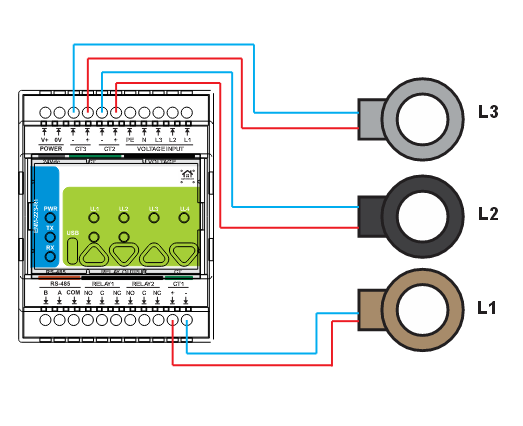
- CT1 is on the BOTTOM row while CT2 and CT3 are on top.
- CT polarity order differs by row: the top blocks read (-,+), CT1 reads (+,-).
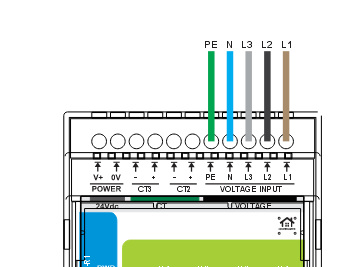
- Voltage input descends L3 L2 L1 from right to left.
- Current-output CT only, secondary <=60 mA RMS. A 1 A or 5 A CT will destroy the module.
- Never open a live CT secondary.
Cabling and Wirings
24 V DC Supply (V+ / 0V)
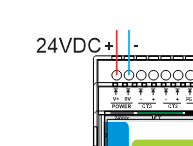
- Power is SELV-rated and supports reverse-polarity protection
- Route power wiring separately from mains and sensor wiring
- Apply terminal strain relief and maintain cabinet segregation
Voltage Inputs (L1 / L2 / L3-N / PE)
Current Transformers (CT1 / CT2 / CT3)
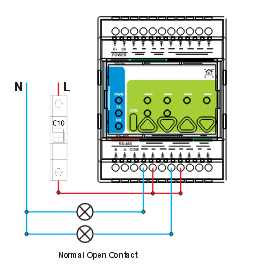
Relay Outputs (NO / COM / NC)
RS-485 / Modbus RTU
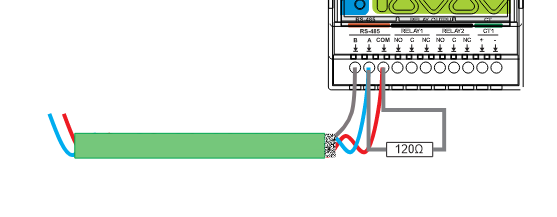
Terminal order differs across the HomeMaster range. Always read the silkscreen - do not wire by habit from another module. On this module the order is B-A-COM. Swapping A and B damages nothing but the node will not communicate. COM is required on every node.
All HomeMaster controllers and modules share the same RS-485 front end.
| Item | Value |
|---|---|
| Transceiver | MAX485CSA+T, half-duplex |
| Galvanic isolation | None — the transceiver shares the device's logic ground |
| Common-mode range | −7 V … +12 V referred to the device's own ground (MAX485 limit) |
| Terminals | A / B / COM |
| Surge protection | 3 × SMAJ6.8CA TVS (A–COM, B–COM, A–B) |
| Overcurrent | 2 × resettable PTC, 1.5 A hold, in series with A and B |
| EMI filtering | Common-mode choke on the A/B pair; COM referenced through 1 MΩ ∥ 4.7 nF |
| Idle state | Fail-safe biasing on board — do not add external bias resistors |
| Termination | 120 Ω at the two physical ends of the bus only |
Bus wiring rules — apply to every device on the bus:
- One twisted pair for A/B, 120 Ω characteristic impedance.
- Run COM to every node. Required, not optional: the ports are not isolated, and COM is what bounds the common-mode voltage the transceivers see.
- Prefer one power supply for the whole bus, distributed in star topology. With separate supplies, additionally tie the 0 V references together at a single point.
- Bond the cable shield to cabinet PE at one end only. Never land a shield on A, B or COM.
- Where the bus crosses into a different electrical installation with its own earthing reference — a utility or billing meter, another building, another cabinet's PE system — fit an external galvanic RS-485 isolator at that boundary. The on-board components are transient protection, not isolation, and will not survive a sustained ground-potential difference.
Cable Recommendations & Shield Grounding
General Routing Rules
- Route low-level signal cables separately from mains, relay outputs, contactors, and power wiring
- If crossing power cables is unavoidable, cross at 90°
- Keep cable runs as short as practical and avoid parallel runs with high-current conductors
- Label cables and provide strain relief at terminals
RS-485 (Modbus) Cable
- Twisted pair for A/B (120 Ω characteristic impedance recommended)
- Second conductor/pair can be used as COM (0V reference) depending on the network design
- Prefer shielding for industrial/noisy panels
Shield Grounding
- Bond cable shield(s) to cabinet PE/EMC ground at the PLC/controller end only by default
- Do not connect shields to RS-485 signal terminals (A/B/COM)
- If both ends are in equipotential bonded cabinets, shields may be bonded at both ends using proper 360° clamps
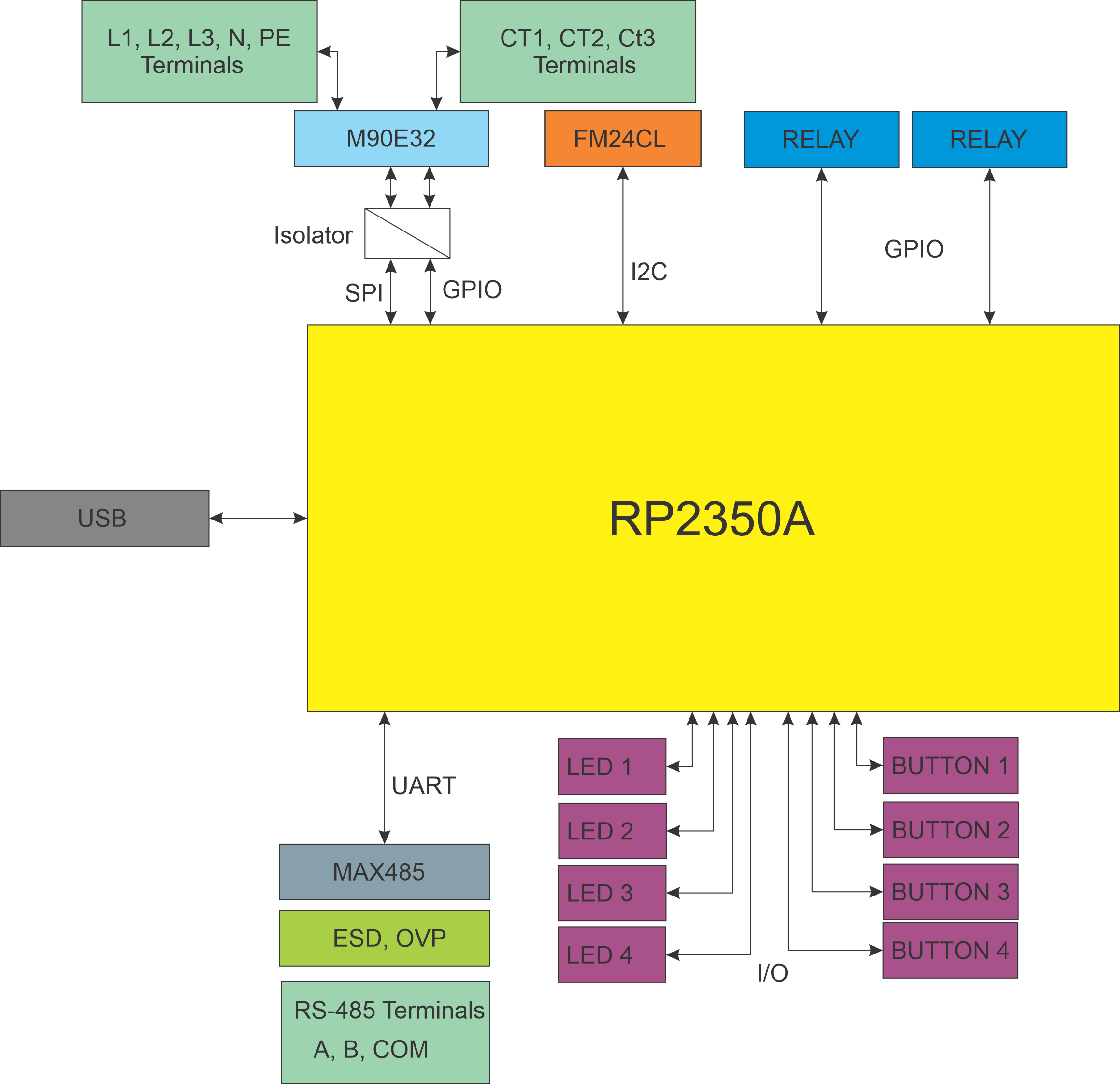
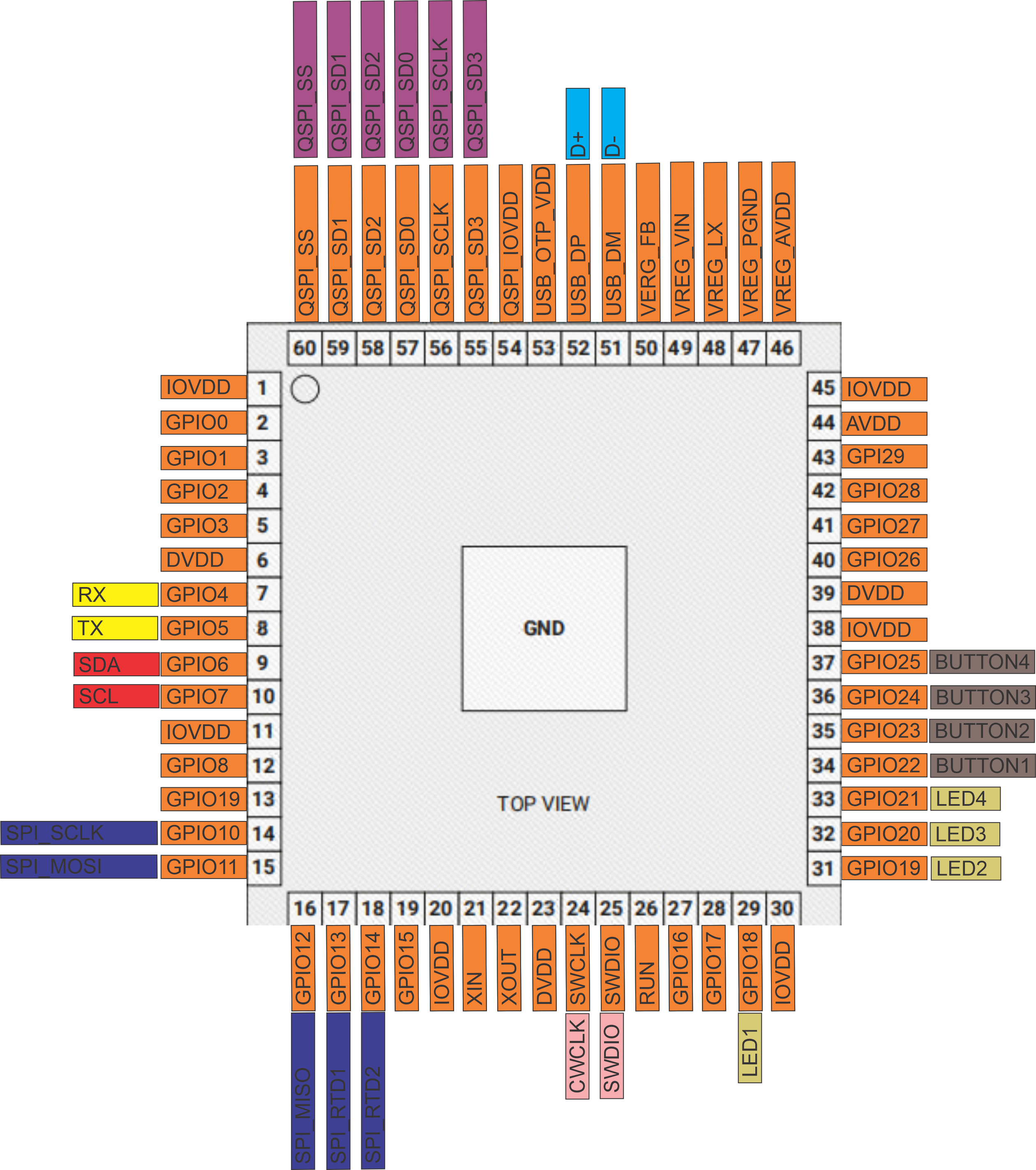
System Architecture & Pinout
Safety and Installation Notes
- Qualified personnel only: Installation by trained technicians familiar with SELV and mains wiring.
- Mixed voltage domains: 24 V DC is SELV; voltage sensing inputs are mains hazardous (85–265 V AC).
- Install inside an IP20 control cabinet and protect terminals using the required front plate/door.
- Respect relay contact system limits (3 A @ 250 V AC resistive) and provide external overcurrent protection.
- For inductive/high-inrush loads: use proper suppression (RC snubbers / TVS as required).
- Use current-output CTs (secondary ≤ 60 mA RMS) — do not use voltage-output CTs (333 mV / 1 V class) or 1 A / 5 A secondaries; observe polarity and shielding to avoid incorrect metering.
- Maintain RS-485 cabling best practices: twisted pair, correct A/B polarity, and bus termination as required.
Compliance & Certifications
The ENM-223-R1 module is CE marked. ISYSTEMS AUTOMATION S.R.L. (HomeMaster® brand) maintains the technical documentation and a signed EU Declaration of Conformity (DoC) available for download in the Documents and Resources section above.
- EMC Directive 2014/30/EU — EN 55032:2015 (Class B emissions), EN 55035:2017 (immunity), tested by Idvorsky Laboratories Ltd. (Job #1648)
- Low Voltage Directive 2014/35/EU — EN 62368-1:2020 + A11:2020, in-house dielectric and isolation testing by ISYSTEMS AUTOMATION compliance laboratory
- RoHS Directive 2011/65/EU — EN IEC 63000 technical documentation
- HomeMaster® — registered EU trademark (EUTM No. 019082911, EUIPO, registered 15 January 2025)
Licensing. Hardware design files — schematics, PCB layouts and bills of materials — are published under CERN-OHL-W v2. Firmware and the ESPHome integration packages are published under the MIT licence. Full terms are in the LICENSE files in the HOMEMASTER repository.
Related products
These other products might interest you