Smart Chimney with MicroPLC, ESPHome & Home Assistant
Wood-fired fireplace water-jacket automation built on a HomeMaster MicroPLC, WLD-521-R1, and DIO-430-R1 — two-pump logic, heat metering on Modbus, gas-boiler fallback, all driven by Home Assistant.
1. How the System Works
Heat Sources
The home heating system this controller runs in has three heat sources:
- a wood-fired fireplace with a water jacket — the primary winter source, and the one this MicroPLC manages;
- a solar collector with an indirect heater tank — the summer and shoulder-season source;
- a gas boiler — the backup, used when the other sources aren't enough.
The connecting node between all of these is the indirect heater tank. Through the three-way valve V3 (see the schematic in section 2), the tank can either be tied into the heating loop or excluded from it. With the valve open, the tank acts simultaneously as a heat consumer (charging up when the loop water is hotter than the tank) and as a thermal accumulator (giving up stored heat when the tank is hotter than the loop). The tank can be charged by both the fireplace and the solar collector; heat can be drawn out by the heating loop and by domestic hot water through a second internal coil. With the valve closed, the tank is bypassed entirely and the loop water flows past it.
The Role of the MicroPLC (this controller)
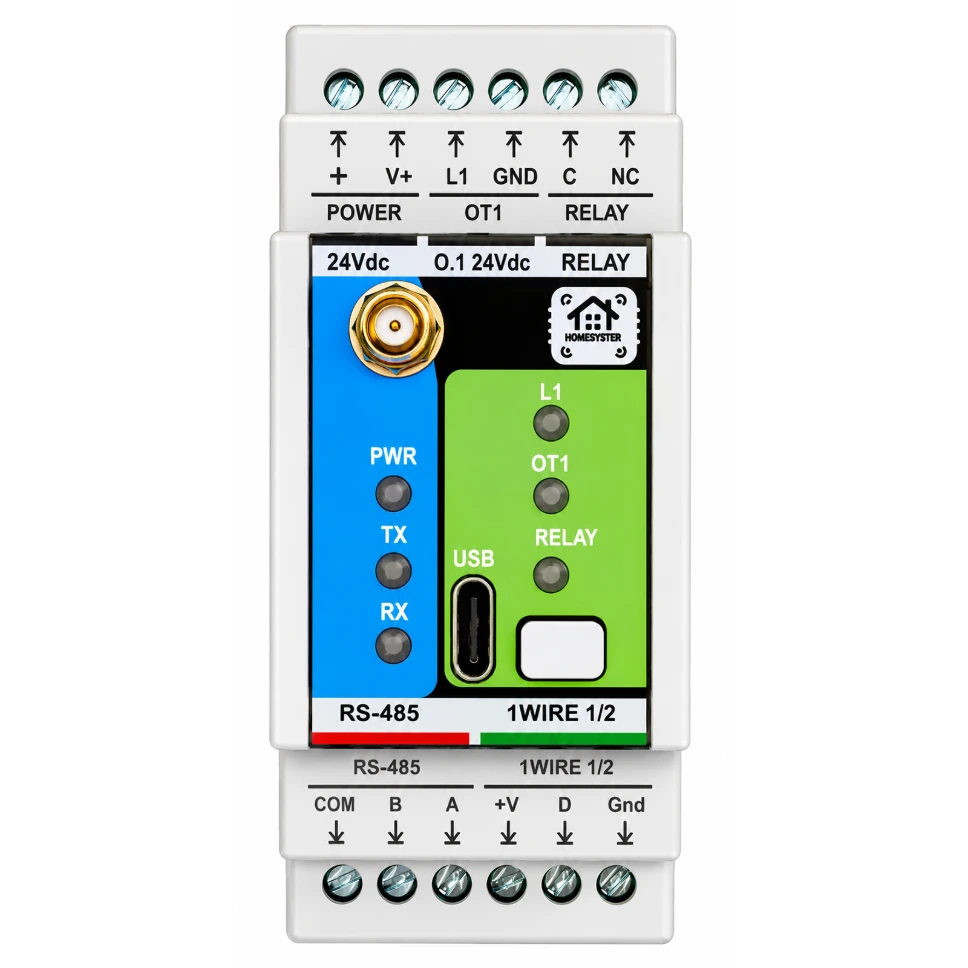
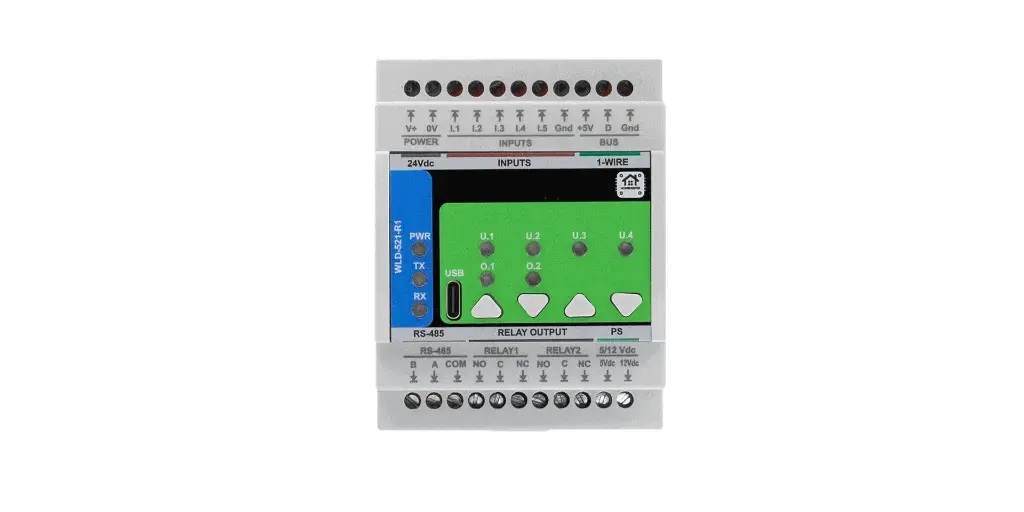
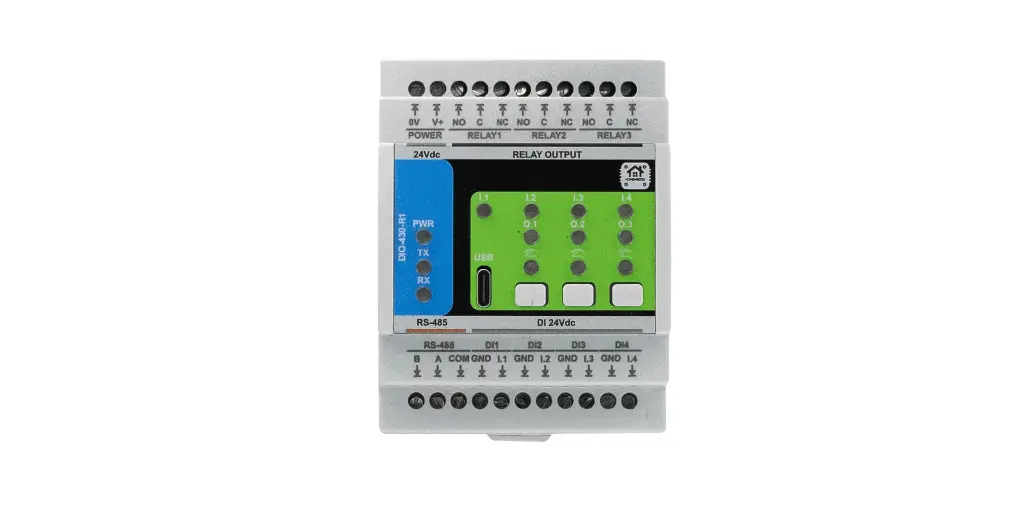
The MicroPLC handles the "wet" side of the system — the fireplace water jacket, the two circulation pumps on the fireplace loop, the gas boiler trigger, heat metering, and the main room thermostat. The DIN-rail panel holds the MicroPLC itself plus two Modbus expansion modules: WLD-521-R1 (a metering module with flow inputs and a heat counter) and DIO-430-R1 (a relay-output module).
The full set of functions the controller performs:
- Reads water-jacket temperatures from two DS18B20 sensors.
- Turns the main circulation pump on under either of two conditions: when the jacket temperature climbs above 35 °C (the fireplace has come up to temperature), or when the solar-loop controller signals "the indirect heater tank is hot enough — please move its heat into the house."
- Turns the backup (emergency) pump on when the jacket temperature reaches 70 °C. More on the two-pump arrangement in the sub-section below.
- Counts the thermal energy delivered by the fireplace. The flow meter on the fireplace loop and the two temperature sensors on supply and return are wired into the WLD-521-R1; the module computes instantaneous power and accumulated energy itself (formulas and assumptions are in section 2). On the dashboard this shows up as
Chimney Heating— at the time of the screenshots 30,330 kWh of recovered heat had been counted. - Triggers the gas boiler — but only when neither the fireplace nor the solar loop is delivering heat and the main HA thermostat is calling for warmth. Free heat sources always take priority.
- Counts cold and hot water consumption in the house — two additional pulse flow meters on the WLD-521-R1.
- Acts as the home's primary room thermostat. The thermostat works off a median temperature derived from several room sensors and raises one of three virtual signals: "heat", "cool", or "ventilate". The "heat" signal is consumed by the controller itself (to decide whether to start the gas boiler). "Cool" and "ventilate" are passed to Home Assistant, where automations pick them up and run the air conditioner and ventilation hardware.
All of this control logic runs locally on the MicroPLC. The control loop ticks every 3 seconds off the on-board PCF8563 hardware RTC. If Wi-Fi or Home Assistant goes away, the controller keeps running on its local sensors — values imported from HA are protected by NaN checks, and any unavailable input is simply dropped from the calculation.
Why Two Pumps in Series
The two circulation pumps on the fireplace loop are installed in series. The second (backup) pump fills two distinct roles:
- Hydraulic headroom when the jacket overheats. When the jacket temperature reaches 70 °C, the MicroPLC kicks in the second pump. Two pumps in series increase the loop's head; the actual increase in flow rate depends on the system's hydraulic resistance — if the loop isn't choked elsewhere, the flow goes up and heat is pulled out of the jacket faster.
- Failure backup. If the main pump dies or its output isn't enough (for example because of an air lock in the loop), the jacket temperature will keep climbing and at 70 °C the second pump will automatically come online — providing circulation in place of the failed unit.
The Role of External Controllers
Some of the functions related to the fireplace and to the heating system in general are implemented on other ESPHome devices. This MicroPLC doesn't talk to those devices directly — all interaction goes through Home Assistant.
- Solar-loop controller. Manages the solar collector and the indirect heater tank (charging the tank from the collector plus a backup electric heating element). When the water in the tank is warm enough that its heat is worth pushing into the house, this controller raises a permission signal in HA — the MicroPLC sees that signal and turns on the main pump.
- Air-side controller for the fireplace. Drives the fans that draw fresh outside air through the cavity around the fireplace and along the flue pipe. The air picks up heat from the walls and is delivered into the rooms. The fans run on setpoints from temperature sensors around the fireplace. On the dashboard this shows up as
Air inlet,Air outlet 1,Air outlet 2,fan 1,fan 2. - Air conditioner and ventilation (via HA automations). The thermostat's
Air ConditionandVentilationvirtual signals go into Home Assistant; HA automations react to them and start the corresponding equipment.
2. The Control System
Heating System Schematic
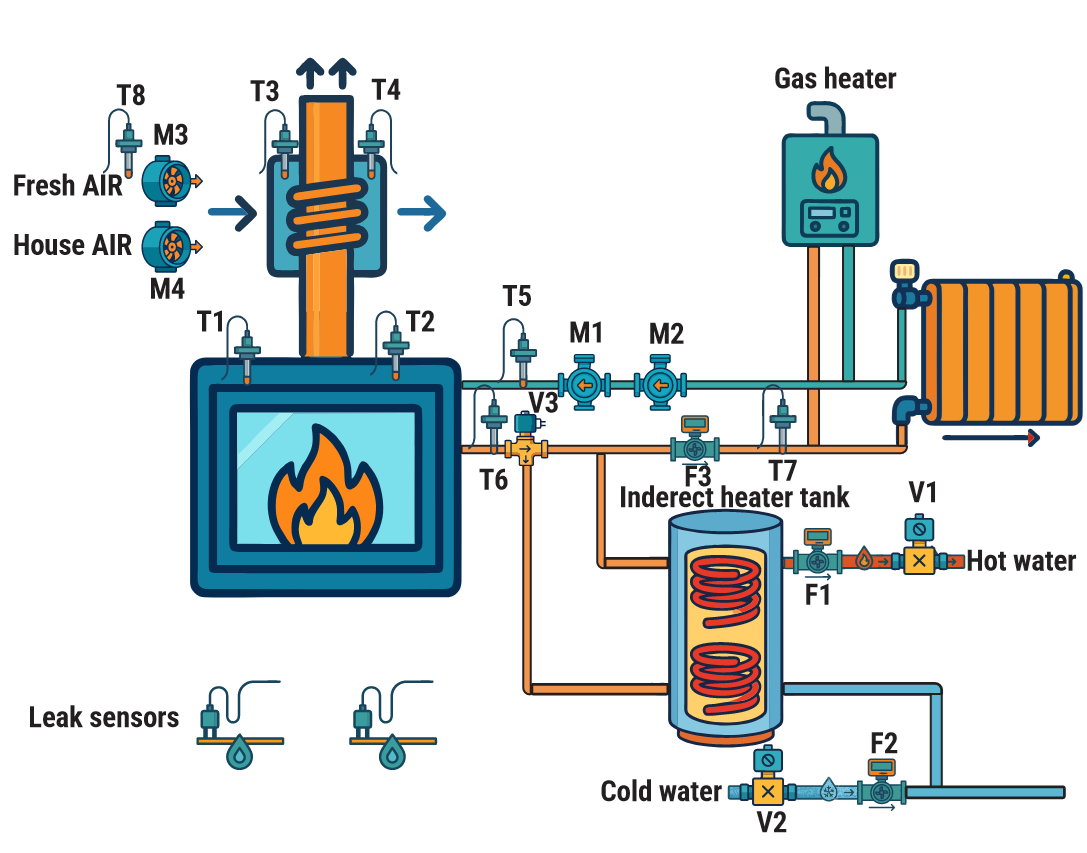
Labels on the schematic:
| Label | What it is |
|---|---|
| T1, T2 | DS18B20 sensors on the fireplace water jacket (wired to MicroPLC, GPIO04) |
| T3, T4 | temperature sensors on the air-side heat exchanger around the flue (handled by the air-side controller) |
| T5, T6 | supply and return of the heating loop through the fireplace (1-Wire on WLD-521-R1, inputs for the heat meter) |
| T7 | temperature at the indirect heater tank's outlet to the main loop (1-Wire on WLD-521-R1) |
| T8 | fresh-air inlet temperature from outside (handled by the air-side controller) |
| M1, M2 | main and backup circulation pumps on the fireplace loop, installed in series |
| M3, M4 | air-side fans for the fireplace (Fresh Air, House Air — handled by a separate controller) |
| V1 | shut-off / mixing valve assembly on the hot water side |
| V2 | shut-off / mixing valve assembly on the cold water side |
| V3 | three-way valve that ties the indirect heater tank into the heating loop or excludes it |
| F1 | hot water flow meter (pulse input on WLD-521-R1) |
| F2 | cold water flow meter (pulse input on WLD-521-R1) |
| F3 | fireplace-loop flow meter (pulse input on WLD-521-R1, primary input for the heat meter) |
| Indirect heater tank | the system's thermal accumulator, with two internal heat-exchange coils |
| Gas heater | the gas boiler (its trigger is wired to a DIO-430-R1 relay) |
| Leak sensors | water-leak sensors (wired to digital inputs on the WLD-521-R1) |
This MicroPLC controls pumps M1 and M2, triggers the gas boiler, and reads sensors T1, T2, T5, T6, T7, flow meters F1, F2, F3, and the leak sensors. The fireplace's air side (T3, T4, T8, M3, M4) is handled by a separate ESPHome controller.
What's in the Panel
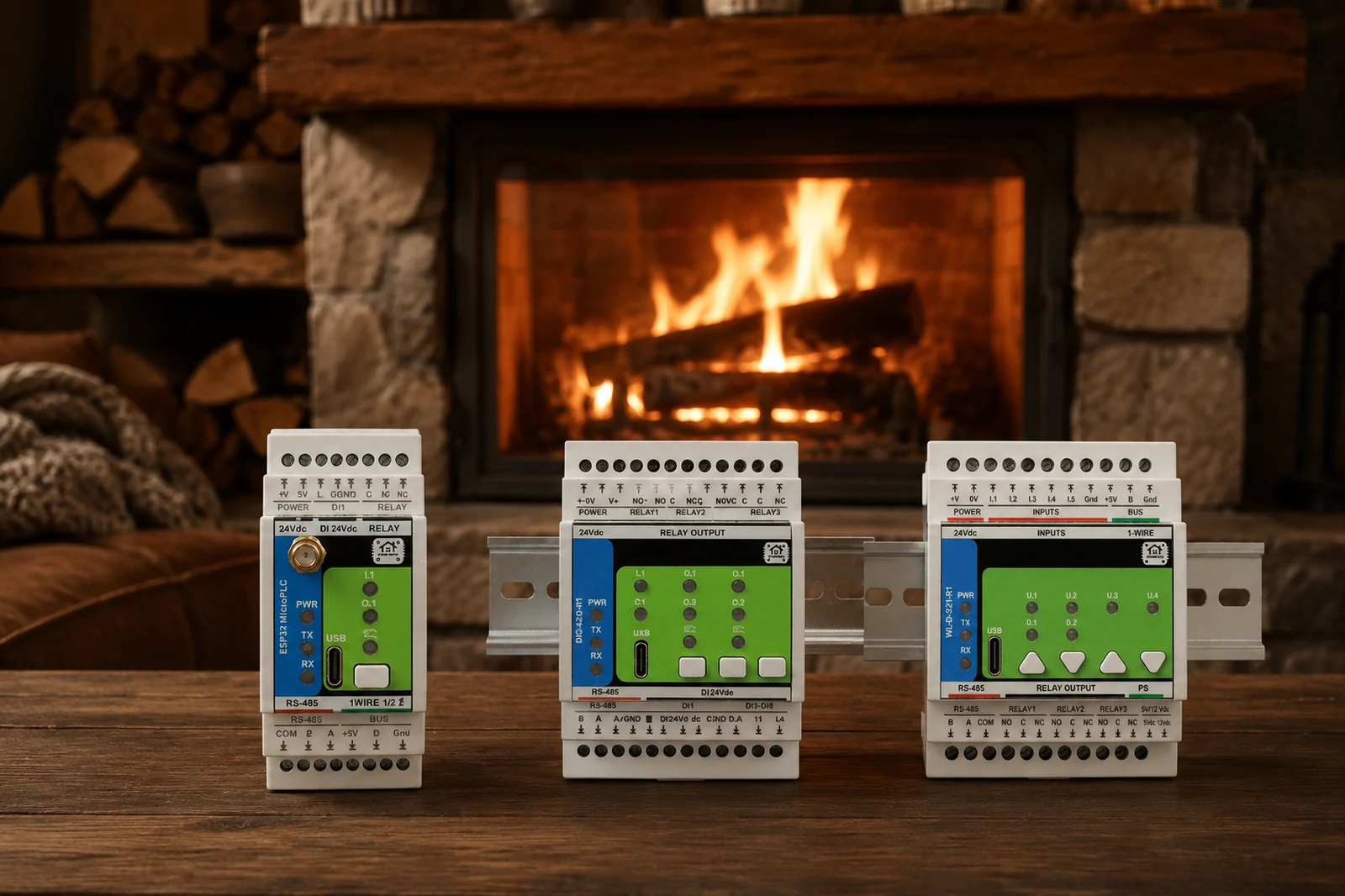
A single DIN-rail enclosure. The rail holds three devices:
MicroPLC — the main controller. ESP32-WROOM, ESPHome firmware. It is the master of the Modbus RS-485 bus. It has one on-board relay, a 1-Wire bus for temperature sensors, and a PCF8563 hardware RTC.
WLD-521-R1 — an RP2350-based module, wired to the Modbus bus as a slave at address 3. This is the metering module: 5 pulse inputs for flow meters, up to 10 1-Wire channels for temperature sensors, 5 channels of (flow + two temperature sensors) for thermal power and energy calculation, plus 2 relay outputs.
DIO-430-R1 — an RP2350-based module, Modbus slave at address 4. A discrete I/O module: 4 digital inputs, 3 LEDs, and 3 relay outputs.
What's Wired to Each Device
To the MicroPLC:
- Two DS18B20 sensors on the 1-Wire bus (GPIO04). They sit in the fireplace water jacket and read the heat-transfer fluid temperature. They appear on the dashboard as Water inside 1 and Water inside 2. These are the sensors that decide when to run the pumps.
- The on-board relay (GPIO26) — drives the main circulation pump on the fireplace loop.
To the WLD-521-R1: - Two 1-Wire temperature sensors on the supply and return pipes of the fireplace heating loop (T5, T6 on the schematic). Their difference (ΔT) is the basis for calculating how much heat the fireplace is delivering. - One additional 1-Wire temperature sensor at the indirect heater tank's outlet to the main loop (T7 on the schematic). - A pulse flow meter on the fireplace circulation loop (F3 on the schematic) — counts how many liters of heat-transfer fluid have passed through the jacket. Used by the heat counter together with T5 and T6. - A pulse flow meter on the cold water inlet to the house (F2 on the schematic). - A pulse flow meter on the hot water line (F1 on the schematic). - Two wired water-leak sensors (placed on the floor in service areas) — wired to digital inputs.
To the DIO-430-R1: - Relay #1 — triggers the gas boiler. - Relay #2 — drives the backup circulation pump.
Where "Fireplace Energy" Comes From
The flow meter on the fireplace loop tells you how much heat-transfer fluid has passed through the jacket (in liters per minute). The two temperature sensors on supply and return tell you how much that fluid was warmed up inside the jacket (ΔT, in °C). The WLD-521-R1 calculates thermal power using the proper physical formula:
m_dot = (flow_L_per_min / 60) × ρ      kg/s
P     = m_dot × Cp × ΔT                W
That is, the volumetric flow is first converted to a mass flow using the fluid's density ρ, and then multiplied by the specific heat Cp and the temperature difference.
Out of the box, the module is configured for water at room temperature: ρ = 1.0 kg/L, Cp = 4186 J/(kg·°C). This is an engineering approximation, not "exact physics":
- The density of water depends on temperature: at 20 °C it really is close to 1.0 kg/L, but at 60–80 °C it drops to about 0.97–0.98 kg/L. So the default value slightly overestimates power by about 2–3 % across the working range of a hot loop. For a domestic heating system, that's an acceptable margin.
- Cp = 4186 J/(kg·°C) is for water. For propylene-glycol-based heat-transfer fluids Cp is noticeably lower (about 3500–3800 J/(kg·°C) depending on concentration). If you have antifreeze in your loop, the default value gives an error well in excess of 2–3 %.
The WLD-521-R1's web configurator exposes editable fields directly in the UI for each of its five heat-counter channels:
- Enable heat — turn the channel on or off.
- Sensor A and Sensor B — pick the supply and return 1-Wire sensors from the list of sensors the module has discovered.
- cp (J/kg·°C) — specific heat of the fluid, default 4186.
- ρ (kg/L) — density of the fluid, default 1.000.
- calib — a calibration coefficient, default 1.0000 (used to fit the meter to a reference measurement).
For the same channel's flow meter you also get Pulses per Liter (default 450) and calibration coefficients for both rate and accumulator. So if you ever need to (antifreeze, an unusual fluid, or a calibration against a reference meter), you change all of these settings right in the browser — no reflashing, no YAML edits.
The instantaneous power that comes out of the formula is integrated over time → accumulated energy in joules → converted to kWh and published to Home Assistant as the entity Chimney Heating.
The MicroPLC doesn't do any of this math itself — the WLD module computes everything internally and hands the finished numbers over the Modbus bus.
3. Bill of Materials
| Component | Specification | Source |
|---|---|---|
| MicroPLC | ESP32-WROOM, ESPHome, Modbus RS-485 master, on-board relay on GPIO26 (with NC contacts), PCF8563 RTC, 1-Wire bus | home-master.eu |
| WLD-521-R1 | RP2350, Modbus RTU slave (address 3): 5 pulse inputs with counters, up to 10 1-Wire channels, 5 heat-meter channels, 2 relays | home-master.eu |
| DIO-430-R1 | RP2350, Modbus RTU slave (address 4): 4 digital inputs, 3 relays, 3 LEDs | home-master.eu |
| DS18B20 (waterproof, cabled) | 1-Wire, range −55…+125 °C, stainless-steel probe with thermowell, cable length to suit each install location. At least 4 are needed (2 for the fireplace water jacket on the MicroPLC, 2 for supply/return of the fireplace heating loop on the WLD), plus more as required for additional points | third-party |
| Pulse flow meter for the fireplace loop (1 pc) | hall-sensor or open-collector type, sized to the pipe diameter (typically G3/4 or G1), range matched to the loop's flow rate (e.g. 1–25 L/min). The pulses-per-liter constant goes into the WLD module's YAML | third-party |
| Pulse flow meters for cold and hot water (2 pcs) | for domestic plumbing, G1/2 or G3/4, typical range 1–30 L/min, hall-sensor / open-collector | third-party |
| Circulation pumps (2 pcs) | main and backup, installed in series on the fireplace loop. This system uses 45 W / 220 V AC pumps — thanks to the modest power, they're driven directly off the relay outputs without any external contactors | third-party |
| Gas boiler | "trigger" input via an external dry contact, with a signalling-circuit current of tens of mA | third-party |
| Water-leak sensors (2 pcs) | wired cable-style water-presence sensors, brought to the WLD-521-R1's digital inputs, mounted on the floor in service areas | third-party |
| 80 °C thermal switch (pressostat) | hardware over-temperature protection for the main pump, wired in parallel with the output contacts of the main-pump relay (closes the pump's power circuit, bypassing the relay) | third-party |
| 85 °C emergency cooling valve | a mechanical valve on the emergency cooling coil inside the fireplace; its inlet is fed from the cold-water supply | third-party |
| DIN-rail enclosure | at least 6 modules wide (MicroPLC + WLD-521-R1 + DIO-430-R1 + power supply + breakers + terminal blocks) | third-party |
| Power supply | DIN-rail mounted; output voltage and wattage to suit the chosen MicroPLC and modules | third-party |
| Cables, ferrules, terminals, breaker | standard wiring materials | third-party |
The 1-Wire pull-up resistor is already on the MicroPLC board — no external resistor is needed. Both pumps and the gas-boiler trigger are driven directly off the MicroPLC and DIO-430-R1 relays, with no external contactors or solid-state relays. This is acceptable because the load is modest: the pumps are 45 W / 220 V AC each (roughly 0.2 A running, with an inrush current several times higher — but still inside the relays' rating), and the gas-boiler "trigger" is a dry contact carrying a signalling-circuit current in the tens of milliamps. With heavier loads (larger pumps, circuits with multi-amp inrush), a contactor between the relay and the load is mandatory.
4. Wiring
4.1. Temperature Sensors
In the fireplace water jacket (on the MicroPLC). Two DS18B20 sensors share a single 1-Wire bus on GPIO04. It's a flat bus — three wires per sensor: data, +3.3 V, GND. The pull-up is already on the board.
On the heating loop (on the WLD-521-R1). Additional DS18B20 sensors are wired into the WLD module's 1-Wire inputs. Two of them sit on the supply and return pipes of the fireplace loop (these feed the heat counter); the rest go to the gas-boiler return and other points in the system.
4.2. Modbus
The MicroPLC is the bus master. The bus runs from the MicroPLC to the WLD-521-R1 (address 3), and from there to the DIO-430-R1 (address 4). Three wires: A, B, and a shared ground.
The bus parameters in YAML:
uart:
  baud_rate: 19200
  parity: NONE
  stop_bits: 1
This is the standard configuration for HomeMaster modules. Wire the bus in a daisy chain (not as a star) and always run the GND reference alongside A/B.
4.3. Relay Outputs
| Output | What it drives | When it activates |
|---|---|---|
| MicroPLC on-board relay (GPIO26) | main circulation pump | jacket temperature above 35 °C |
| DIO-430-R1, relay #2 | backup circulation pump | jacket temperature above 70 °C |
| DIO-430-R1, relay #1 | gas boiler trigger | fireplace not running AND HA thermostat calling for heat |
An important wiring detail for the main pump. The pump is wired to the normally-closed (NC) contacts of the on-board relay. This is deliberate, and it gives us another layer of over-temperature protection for the fireplace: in any abnormal state of the controller — power loss, ESP hang, firmware reboot, hardware failure — the relay sits in its de-energized state with the NC contacts closed, and the pump simply keeps running on its own, with no controller involvement. The pump's safe state in this system is "on". If something goes wrong with the electronics while there's a fire in the fireplace, the pump automatically keeps pulling heat out of the jacket and prevents an over-temperature event.
The inverted: true flag in YAML is a consequence of this wiring. The command switch.turn_on: relay1 means, semantically, "the pump should be running"; since "pump running" corresponds to a de-energized relay (NC contacts closed), the flag inverts the GPIO level so that a logical turn_on in YAML maps to a physically de-energized relay rather than the other way around.
4.4. Flow Meters
All three flow meters are wired into pulse inputs on the WLD-521-R1 (WLD#1 DI1–DI5). On the dashboard their readings appear as:
- WLD#1 Flow1 Total / Flow1 Rate — the fireplace-loop flow meter (the one used by the heat counter)
- "Cold water" (2,794.924 L total) — cold water into the house
- "Hot water" (1,167.729 L total) — hot water into the house
5. One-Time Module Setup via WebConfig
Before the MicroPLC can talk to the WLD-521-R1 and the DIO-430-R1, each expansion module needs its own one-time configuration. This is done entirely in the browser: plug the module's USB-C port into your laptop, open the module's WebConfig page in Chrome or Edge, click Connect, and pick the serial device that appears. All settings are stored in the module's onboard flash and survive power cycles.
The MicroPLC's ESPHome YAML does not contain any of this information — it only knows the Modbus address and baud rate of each module. Everything below — sensor names, calibration constants, which physical input drives which relay — lives inside the modules themselves.
5.1. WLD-521-R1: Modbus Address and 1-Wire Sensors
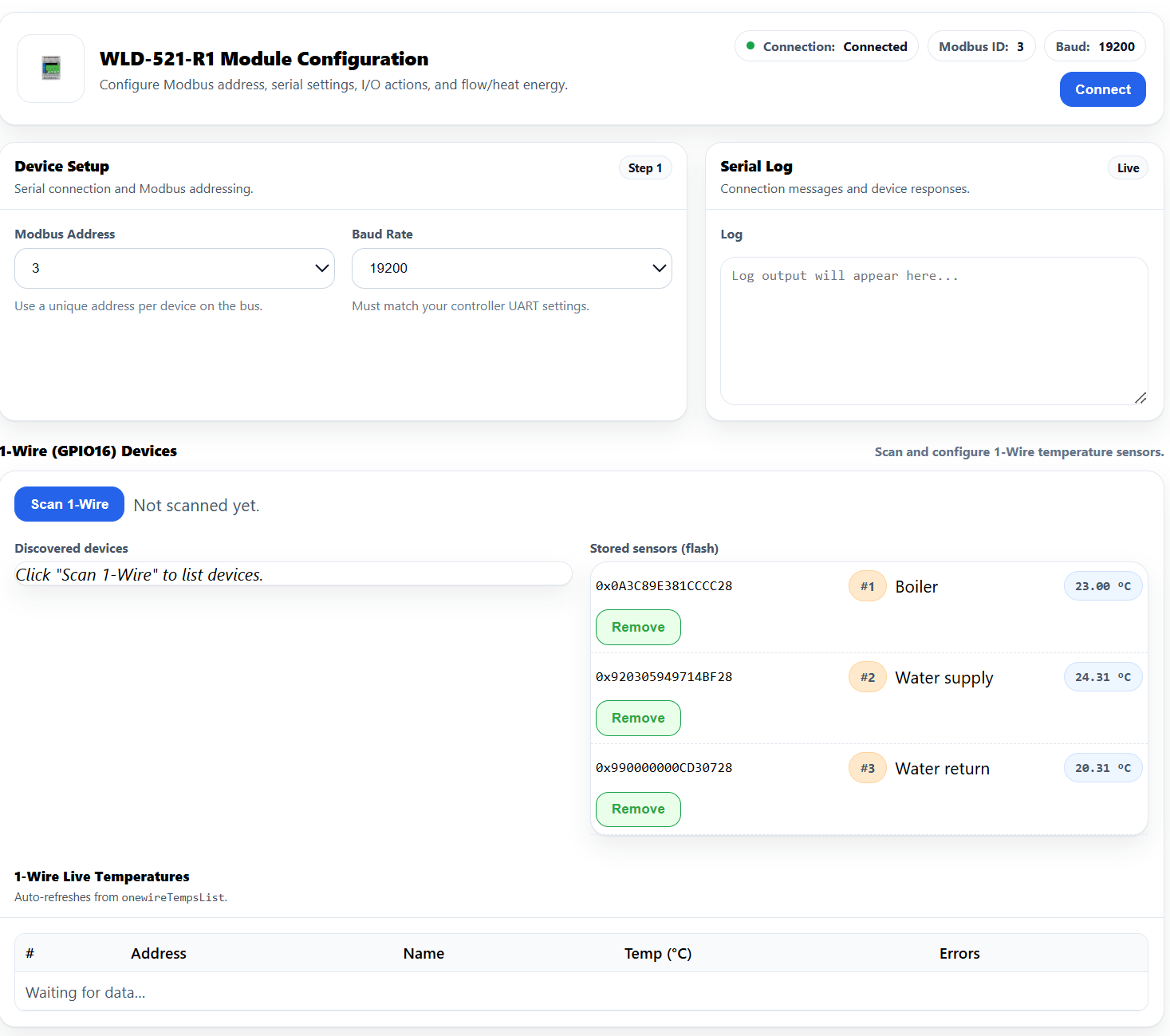
The WLD module sits at Modbus address 3 and runs at 19200 baud to match the MicroPLC's UART. The bottom of the page lists every DS18B20 the module has discovered on its 1-Wire bus and lets you give each one a human-friendly name. In this install three sensors are stored:
- #1 Boiler — the gas-boiler return pipe.
- #2 Water supply — the supply side of the fireplace loop (this becomes Sensor A for the heat meter in 5.2).
- #3 Water return — the return side of the fireplace loop (this becomes Sensor B for the heat meter in 5.2).
The names are arbitrary and only affect what's shown in the WebConfig UI; the controller addresses sensors by their 64-bit ROM IDs (the 0x…28 strings), not by name.
5.2. WLD-521-R1: Flow Meter and Heat Counter on IN1
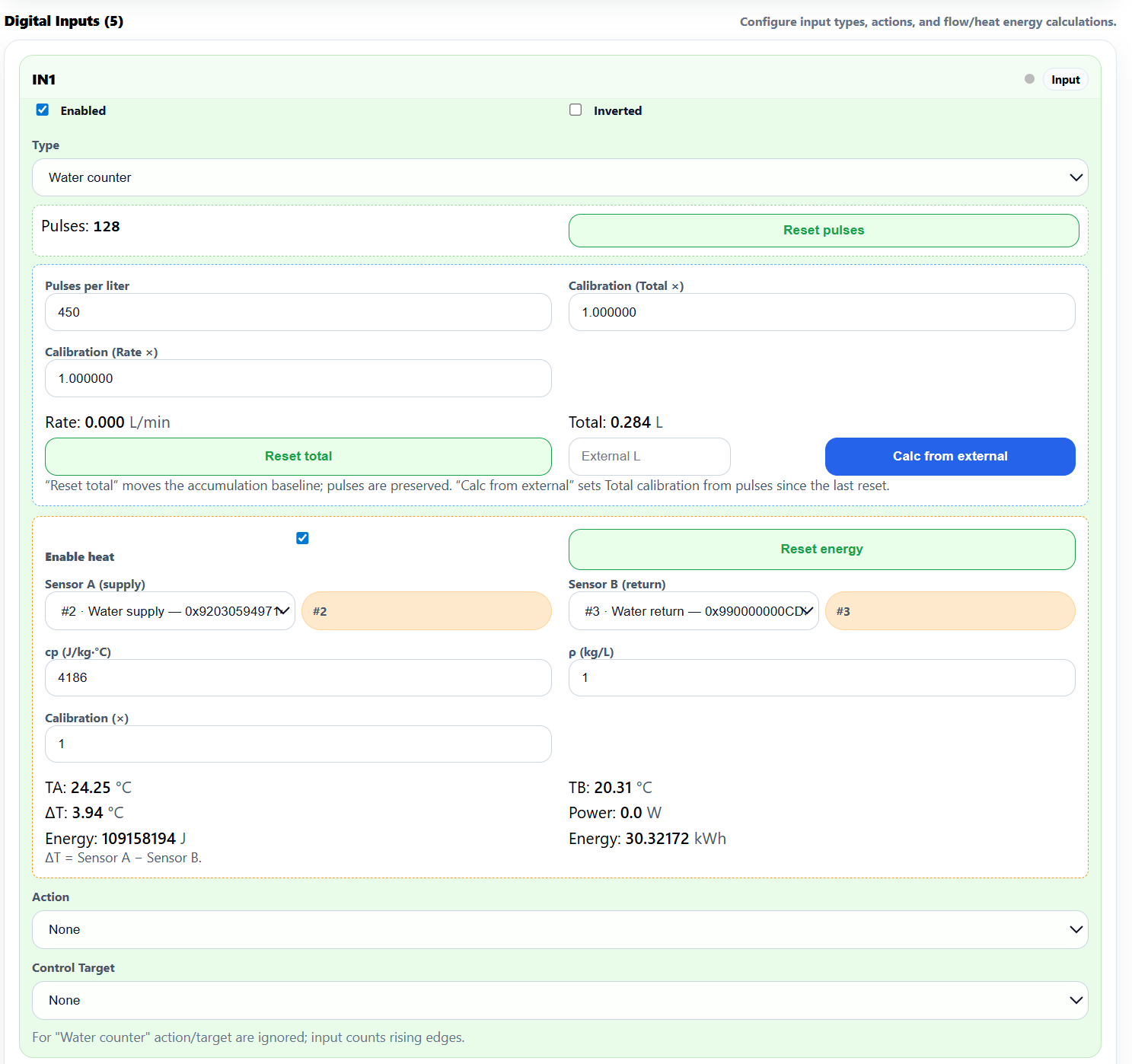
This is the page that turns the fireplace-loop flow meter into a thermal energy counter. The settings here implement exactly the formula explained in section 2:
- Type: Water counter — interprets pulses on IN1 as a flow rate.
- Pulses per liter: 450 — the constant printed on this particular flow meter's nameplate; adjust to match your own meter.
- Enable heat — ticked. This adds the thermal-power channel on top of the flow counter.
- Sensor A (supply) = #2 Water supply, Sensor B (return) = #3 Water return — picked from the list of 1-Wire devices stored in 5.1.
- cp = 4186 J/(kg·°C) and ρ = 1 kg/L — water defaults. Change these only if you have antifreeze in the loop (see section 2).
- Calibration ×1 on flow rate, flow total, and energy — leave these at 1 unless you're matching the meter against a reference.
The live readout at the bottom of the panel — TA, TB, ΔT, Power, Energy — is exactly what the module publishes on Modbus. The MicroPLC forwards these to Home Assistant under names like WLD#1 Flow1 Total, WLD#1 Power1, and Chimney Heating.
Two more pulse flow meters (cold and hot domestic water) are wired into IN2 and IN3 of the same module. They use the same Water counter type but with Enable heat turned off — they only need pulses → liters, no temperature math.
5.3. DIO-430-R1: Modbus, Buttons, Relays, and LEDs

The DIO module sits at Modbus address 4 and shares the same 19200-baud RS-485 bus. Three sections matter:
- Digital Inputs (4) — all four enabled, Action set to None. The module just reports input state on Modbus; the MicroPLC sees the bits and decides what (if anything) to do.
- Relays (3) — all enabled, no inversion. Relay 1 drives the gas-boiler trigger, Relay 2 drives the backup circulation pump, Relay 3 is spare. The MicroPLC turns these on and off over Modbus from inside Rules B and C of the ESPHome YAML.
- Buttons (3) — each front-panel button is wired locally to override one relay (Button 1 → Relay 1, Button 2 → Relay 3, Button 3 → Relay 2). This lets an operator standing in front of the cabinet manually energize any relay without going through Home Assistant — useful for commissioning and for forcing the backup pump on during a power-up test.
- User LEDs (3) — Solid mode, with each LED's Source set to the matching Overridden Relay. The LEDs therefore mirror the actual energized state of each relay, regardless of whether the command came from Modbus or from a local button press.
None of this is duplicated in the MicroPLC's YAML — the packages/dio_430_r1.yaml file only exposes the relays and inputs as Modbus entities. Button-to-relay mapping and LED-source selection are purely module-local, so even if you remove the MicroPLC from the bus the operator still has working local control of the three relays.
6. The Full ESPHome Configuration
This is the working configuration from the actual deployed controller. To build it for your own install:
1. Replace the three values marked REPLACE_WITH_YOUR_OWN_* with your own.
2. Replace the DS18B20 addresses with the addresses of your own sensors (the addresses show up in the ESPHome boot log — the one_wire platform automatically lists every device it finds on the bus along with its 64-bit address).
3. Put your Wi-Fi credentials in secrets.yaml.
esphome:
  name: micoplc-heating
  friendly_name: MicoPLC-Heating

esp32:
  board: esp32dev
  framework:
    type: esp-idf

logger:

api:
  encryption:
    key: "REPLACE_WITH_YOUR_OWN_API_KEY"

ota:
  - platform: esphome
    password: "REPLACE_WITH_YOUR_OWN_OTA_PASSWORD"

wifi:
  ssid: !secret wifi_ssid
  password: !secret wifi_password
  ap:
    ssid: "Micoplc-Heating Fallback Hotspot"
    password: "REPLACE_WITH_YOUR_OWN_AP_PASSWORD"

captive_portal:

uart:
  id: uart_modbus
  tx_pin: 17
  rx_pin: 16
  baud_rate: 19200
  parity: NONE
  stop_bits: 1

modbus:
  id: modbus_bus
  uart_id: uart_modbus

# Pull WLD and DIO module definitions directly from the HomeMaster repository
packages:
  wld1:
    url: https://github.com/isystemsautomation/HOMEMASTER
    ref: main
    files:
      - path: WLD-521-R1/Firmware/v0.1.0/default_wld_521_r1_plc/default_wld_521_r1_plc.yaml
        vars:
          wld_prefix: "WLD#1"
          wld_id: WLD521_1
          wld_address: 3
    refresh: 24h
  dio1:
    url: https://github.com/isystemsautomation/HOMEMASTER
    ref: main
    files:
      - path: DIO-430-R1/Firmware/v0.1.0/default_dio_430_r1_plc/default_dio_430_r1_plc.yaml
        vars:
          dio_prefix: "DIO#1"
          dio_id: dio_1
          dio_address: 4
    refresh: 24h

time:
  - platform: pcf8563
    id: pcf8563_time
    address: 0x51
    on_time:
      - seconds: /3
        then:
          # --- Rule A: main pump — 35 °C threshold ---
          - if:
              condition:
                lambda: |-
                  const float t1 = id(chimney_water2).state;
                  const float t2 = id(inside_chimney).state;
                  const float th = id(temp_inside_heater).state;

                  const bool chimney_on =
                    (!isnan(t1) && t1 > 35.0f) ||
                    (!isnan(t2) && t2 > 35.0f);

                  const bool electric_combo_on =
                    (!isnan(th) && th > 39.0f) &&
                    id(electric_heating).state;

                  return chimney_on || electric_combo_on;
              then:
                - switch.turn_on: relay1
              else:
                - if:
                    condition:
                      lambda: |-
                        const float t1 = id(chimney_water2).state;
                        const float t2 = id(inside_chimney).state;
                        const float th = id(temp_inside_heater).state;

                        const bool chimney_off =
                          (!isnan(t1) && t1 < 35.0f) &&
                          (!isnan(t2) && t2 < 35.0f);

                        const bool electric_combo_off =
                          (!isnan(th) && th < 35.0f) &&
                          (!id(electric_heating).state);

                        return chimney_off && electric_combo_off;
                    then:
                      - switch.turn_off: relay1

          # --- Rule B: backup pump — 70 °C threshold ---
          - if:
              condition:
                lambda: |-
                  const float t1 = id(chimney_water2).state;
                  const float t2 = id(inside_chimney).state;
                  return (!isnan(t1) && t1 > 70.0f) || (!isnan(t2) && t2 > 70.0f);
              then:
                - switch.turn_on: dio_1_relay2
              else:
                - if:
                    condition:
                      lambda: |-
                        const float t1 = id(chimney_water2).state;
                        const float t2 = id(inside_chimney).state;
                        return (!isnan(t1) && t1 < 70.0f) && (!isnan(t2) && t2 < 70.0f);
                    then:
                      - switch.turn_off: dio_1_relay2

          # --- Rule C: gas boiler trigger — only when no other source is delivering heat ---
          - if:
              condition:
                and:
                  - switch.is_off: relay1
                  - binary_sensor.is_off: dio_1_rly2_state
                  - switch.is_on: heating
              then:
                - switch.turn_on: dio_1_relay1
              else:
                - switch.turn_off: dio_1_relay1
  - platform: homeassistant
    on_time_sync:
      then:
        pcf8563.write_time:

i2c:
  - id: bus_a
    sda: 32
    scl: 33
    scan: true

one_wire:
  - platform: gpio
    pin: GPIO04
    id: hub_1

switch:
- platform: gpio
  name: "Relay"
  pin: 26
  id: relay1
  inverted: True
- platform: template
  name: "Air Condition"
  id: air_cond
  optimistic: True
- platform: template
  name: "Ventilation"
  id: air_ventilation
  optimistic: True
- platform: template
  name: "Heat"
  id: heating
  optimistic: True

sensor:
- platform: dallas_temp
  one_wire_id: hub_1
  address: 0x85030994971ce228
  name: "Chimney Temperature #1"
  id: chimney_water1
  update_interval: 5s
- platform: dallas_temp
  one_wire_id: hub_1
  address: 0xfa00000094def728
  name: "Chimney Temperature #2"
  id: chimney_water2
  update_interval: 5s
- platform: homeassistant
  id: inside_temperature
  entity_id: sensor.indoor_median_temperature
  internal: true
- platform: homeassistant
  id: inside_chimney
  entity_id: sensor.chimney_esp32_chimney_temperature_2
  internal: true
- platform: homeassistant
  id: temp_inside_heater
  name: "Temp inside heater"
  entity_id: sensor.miniplc_solar_heater_temperature
  internal: false
- platform: uptime
  name: "Uptime"
  unit_of_measurement: "h"
  accuracy_decimals: 1
  filters:
    - lambda: return x / 3600.0;
- platform: wifi_signal
  name: "WiFi Signal"
  update_interval: 60s
- platform: internal_temperature
  name: "ESP Temperature"
  update_interval: 60s

binary_sensor:
  - platform: template
    name: "Chimney State"
    id: chimney_state
    device_class: heat
    lambda: |-
      const float t1 = id(chimney_water2).state;
      const float t2 = id(inside_chimney).state;
      if ((!isnan(t1) && t1 > 30.0f) || (!isnan(t2) && t2 > 30.0f)) {
        return true;
      } else {
        return false;
      }
  - platform: homeassistant
    name: "Electric heating state"
    entity_id: switch.homemaster_microplc_aio_enm_1_relay_1
    id: electric_heating
    internal: false

status_led:
  pin:
    number: GPIO25
    inverted: true
    id: st_led

climate:
  - platform: thermostat
    name: "Thermostat Boiler Controller"
    visual:
      min_temperature: 18
      max_temperature: 26
      temperature_step: 0.5
    sensor: inside_temperature
    min_cooling_off_time: 300s
    min_cooling_run_time: 300s
    min_heating_off_time: 300s
    min_fanning_run_time: 30s
    min_fanning_off_time: 30s
    min_heating_run_time: 300s
    min_idle_time: 30s
    cool_action:
      - switch.turn_on: air_cond
    heat_action:
      - switch.turn_on: heating
    idle_action:
      - switch.turn_off: heating
      - switch.turn_off: air_ventilation
      - switch.turn_off: air_cond
    fan_only_action:
      - switch.turn_on: air_ventilation
    default_preset: Home
    preset:
      - name: Home
        default_target_temperature_low: 20 °C
        default_target_temperature_high: 22 °C
7. Walking Through the Configuration
7.1. Boilerplate Blocks: esp32, api, ota, wifi, captive_portal
The standard set for any MicroPLC-based ESPHome project:
- esp32 with board: esp32dev and framework: esp-idf — this is the generic target for the ESP32-WROOM that's installed on the MicroPLC board (ESP-IDF is chosen as the framework because that's what the HomeMaster packages build cleanly against).
- api with an encryption key — the main link to Home Assistant.
- ota with a password — over-the-air firmware updates.
- wifi — primary Wi-Fi plus a fallback access point in case the primary network is down.
- captive_portal — the built-in web page for configuring Wi-Fi via the fallback AP.
7.2. The Modbus Bus: uart + modbus
UART2 on GPIO17 (TX) and GPIO16 (RX), 19200 baud, 8N1. The WLD-521-R1 and DIO-430-R1 modules sit downstream on this bus.
7.3. Pulling in the Modules: packages
This is the most convenient pattern in the HomeMaster ecosystem. Instead of hand-writing dozens of Modbus register definitions for the modules, ESPHome pulls ready-made YAML files straight from the HomeMaster GitHub repository:
packages:
  wld1:
    url: https://github.com/isystemsautomation/HOMEMASTER
    ref: main
    files:
      - path: WLD-521-R1/Firmware/v0.1.0/default_wld_521_r1_plc/default_wld_521_r1_plc.yaml
        vars:
          wld_prefix: "WLD#1"
          wld_id: WLD521_1
          wld_address: 3
    refresh: 24h
What's going on here:
- url and ref: main — the repository and branch we're pulling the file from.
- path — the path to the specific file inside the repository.
- vars — variables that get substituted inside the imported file. This is how you set the entity-name prefix in Home Assistant, the internal identifier, and the module's address on the Modbus bus.
- refresh: 24h — the interval at which ESPHome checks the remote file for updates at compile time (a value suitable for a production system; for development and testing it makes sense to set this much lower — e.g. 1s — so every build pulls the latest version from the repo). This is not the Modbus polling interval. Modbus register polling is configured inside the package files themselves — the standard update_interval for the Modbus sensors in those packages is on the order of seconds (typically 1–5 s depending on the specific entity), which is more than enough for thermal control with a 3-second tick.
Once the WLD package is imported, every entity from the module shows up in Home Assistant automatically: 5 heat-counter channels (Heat1–Heat5 with Power, ΔT, Energy fields), 5 flow meters (Rate, Total), 10 1-Wire temperature channels, 5 digital inputs with counters, and 2 relays. Same story with the DIO-430.
Out of the 5 heat-counter channels we use Heat1 — it's bound to the flow meter on the fireplace loop and to the two temperature sensors on the supply and return pipes. The Chimney Heating entity (accumulated energy in kWh) is just WLD#1 Heat1 Energy renamed in HA.
7.4. The Clock and the Logic: time + Rules A / B / C
This is the heart of the controller.
pcf8563 — the on-board hardware real-time clock. It sits on the I²C bus at address 0x51 and runs independently of Wi-Fi: even with no internet it keeps ticking. That matters because the entire control loop is driven off this clock — every 3 seconds, it triggers all three rules.
The second time: homeassistant platform is for sync: when HA is reachable, the PCF8563 picks up the network time.
Rule A: the main pump.
Every 3 seconds, the controller looks at three temperatures and one state:
- the fireplace water-jacket temperature (sensor 1 or 2);
- the water temperature inside the indirect heater tank (temp_inside_heater, imported from HA from the solar-loop controller);
- the permission signal from the solar-loop controller (electric_heating, imported from HA — the state of a relay that the solar controller raises when it decides that the tank is hot enough to share its heat with the house).
The main pump (relay1) turns on if either of the following is true:
- at least one of the two sensors in the fireplace water jacket reads above 35 °C — i.e. the fireplace has come up to temperature and needs to be unloaded, or
- the indirect heater tank is above 39 °C and the solar-loop controller has raised its permission signal — i.e. the sun has heated the tank and is asking us to push that heat into the system.
The pump only turns off when all of the conditions stop being met simultaneously: both jacket sensors are below 35 °C and the indirect heater tank is below 35 °C and the permission signal is gone.
On hysteresis. The logic here is more interesting than it looks at first glance.
For the solar-loop branch, hysteresis is built in explicitly on temperature: turn-on at 39 °C, turn-off at 35 °C — after the first activation the tank has to cool by 4 °C before the pump turns off.
For the fireplace branch there is no temperature hysteresis: the on threshold and the off threshold are both 35 °C. But that doesn't mean chatter is guaranteed — what saves you here is the asymmetry of the logic: OR for turn-on / AND for turn-off.
- Turn-on condition:
(t1 > 35) OR (t2 > 35)OR the electric combo. Any single sensor above 35 → the pump turns on. - Turn-off condition:
(t1 < 35) AND (t2 < 35)AND the electric combo is off. To turn off, all sources have to confirm "no heat".
This asymmetry is something like hysteresis — not in temperature, but in "sensor voting": ON happens easily (one vote is enough); OFF requires a consensus of all sources. On top of that, the comparators are strict (> and <, not ≥ / ≤) — at exactly 35.000 °C neither condition fires and the relay holds its current state.
In actual operation, chatter on this branch is unlikely for two reasons. First, the two sensors in the jacket (Water inside 1 and Water inside 2) are physically located at different points and normally read different temperatures — they almost never hover around 35 °C at the same moment. Second, the water in the jacket either heats actively (with a fire going, the temperature blows past the threshold quickly) or cools slowly (and even then the downward dynamics don't linger near 35 °C). The "temperature stuck right at the threshold with measurement noise" scenario is genuinely rare in practice.
If chatter does turn out to be a problem — say, after a long burn-down when both temperatures slowly drift down to room temperature — splitting the thresholds in the lambda is trivial (e.g. turn on at 38 °C, turn off at 32 °C).
Every comparison is wrapped in a NaN check (!isnan(...)). That means if any sensor imported from HA is temporarily unavailable and returns "not a number", its term is simply removed from the expression. The controller doesn't "fall through to false" and doesn't make spurious switching decisions — it just keeps running on the inputs it does have.
Rule B: the backup pump.
Simpler logic. If at least one of the two jacket sensors reads above 70 °C, the backup pump (dio_1_relay2) turns on. When both sensors drop below 70 °C, the backup pump turns off.
This rule is independent of the thermostat and of Rule A. If the fireplace water jacket is overheating, the backup pump comes on. The pumps are wired in series: with both running, the loop's head goes up; the actual increase in flow rate depends on the system's hydraulic resistance — if the loop isn't choked elsewhere, the flow rate goes up too, and heat is pulled out of the jacket faster. As a side benefit, the second pump also provides backup for a failure of the first.
Rule C: the gas boiler. The gas boiler turns on only when all three of the following conditions are simultaneously true: - the main pump is off (so the fireplace isn't running); - the backup pump is off (so the jacket isn't overheating); - the virtual "heat" signal from the HA thermostat is active.
In any other situation, the boiler is off. In other words, the boiler only fires when the house genuinely needs heat (the thermostat is asking for it) and the free heat sources aren't delivering (the fireplace is cold and there's no over-temperature).
When the fireplace fires up again, Rule A turns the main pump on → on the very next tick, Rule C sees that relay1 is now on → and the gas boiler is shut off immediately. Free heat automatically takes priority.
7.5. I²C and 1-Wire
i2c on SDA=GPIO32, SCL=GPIO33 — for the PCF8563 RTC. The scan: true parameter triggers a bus scan at boot and logs whatever addresses are found.
one_wire on GPIO04 — the bus for the two DS18B20s in the water jacket. ESPHome automatically logs every device it finds at boot — no separate flag is needed for that.
7.6. Switches
The switch: block defines four entities — but only one of them is physical.
relay1 — the actual physical relay on the MicroPLC board, GPIO26. The inverted: true flag is needed because the pump is wired to the normally-closed contacts of this relay (see the "Relay outputs" section). That choice was made for safety: if the controller loses power or fails, the relay is de-energized, the NC contacts are closed, and the pump keeps running on its own — preventing the fireplace from overheating. The flag inverts the GPIO level so that a logical turn_on in YAML ("the pump should be running") maps onto a physically de-energized relay.
air_cond, air_ventilation, heating — these are virtual switches (platform: template, optimistic: true). They don't drive any pin or any relay directly. They're just three flags in Home Assistant that the thermostat uses to signal "need cooling", "need ventilation", "need heating".
Who reacts to those flags:
- heating — read by Rule C right here on this controller (to decide whether to start the gas boiler).
- air_cond — the switch's state is sent to Home Assistant, and HA's own automations then start the air conditioner (through whatever equipment / integration is appropriate).
- air_ventilation — same idea: HA sees the state, and its automations start the ventilation hardware.
In other words, the MicroPLC doesn't talk to the ventilation or air-conditioning hardware directly. It just hands its intent over to HA — "we need cooling / we need ventilation" — and the decision about what to actually turn on, and how, is made on the HA side.
This is a standard pattern when a system is split across multiple controllers: one controller declares intent, others physically execute it.
7.7. Sensors
Local temperature sensors — the two DS18B20s in the water jacket, polled every 5 seconds.
Imports from Home Assistant (sensors that physically live on other devices):
- inside_temperature — the median temperature inside the house (HA computes the median itself, from several room sensors). Used as the input to the thermostat.
- inside_chimney — a second flue-temperature sensor on a separate ESP32. Used in Rule A for cross-checking.
- temp_inside_heater — the water temperature inside the indirect heater tank, imported from the solar-loop controller (entity_id sensor.miniplc_solar_heater_temperature). Used in Rule A — this is the first half of the condition "the sun has heated the tank enough that we should push its heat into the heating system".
Diagnostic sensors — uptime, Wi-Fi signal strength, the ESP32 chip's internal temperature. Useful for keeping an eye on controller stability.
7.8. Binary Sensors
The binary_sensor: block contains two entities.
chimney_state — a simple template sensor with device_class: heat. It goes high when at least one of the two jacket sensors reads above 30 °C. The threshold is intentionally lower than Rule A's (which is 35 °C) — this gives the user a slightly earlier visual cue on the dashboard that "the fireplace is starting to come up to temperature", before the pump actually kicks in.
electric_heating — an import of a relay state from the solar-loop controller (switch.homemaster_microplc_aio_enm_1_relay_1). This is the permission signal from that controller: "the indirect heater tank has been warmed enough by the sun (or by the backup electric element) — it's OK to push its heat into the heating system". This signal is the second half of the "solar" branch's condition in Rule A.
7.9. The Thermostat
This is the "main HA heating thermostat" that decides whether the gas boiler should run.
How it works:
- The thermostat looks at inside_temperature (the median home temperature from HA).
- If the house is colder than the lower setpoint, the thermostat raises the heating flag — Rule C decides whether to fire up the boiler.
- If the house is warmer than the upper setpoint, the thermostat raises the air_cond flag — that flag goes into HA, and HA automations start the air conditioner.
- In fan_only mode the thermostat raises the air_ventilation flag — that flag goes into HA, and HA automations start ventilation.
- In idle mode all three flags are off.
The min_*_time parameters (300 seconds for heating/cooling, 30 seconds for ventilation and idle) protect downstream loads from rapid on/off cycling.
On the Home Assistant dashboard the thermostat appears as a "Controller" card with two setpoints (the lower one for heating, the upper for cooling), the current temperature, and the current state. In the screenshot, the state is Idle — the room is at 22.5 °C, which falls between the setpoints of 19.5 °C and 24.0 °C, so the thermostat doesn't do anything. The default preset is Home, range 20–22 °C, step 0.5 °C.
8. What Shows Up in Home Assistant
Once the controller is flashed and joins Wi-Fi, it appears in Home Assistant automatically through the ESPHome integration — no extra setup, no MQTT needed.
The entities you'll see:
- The thermostat
climate.thermostat_boiler_controller. - Local temperatures —
Chimney Temperature #1,Chimney Temperature #2. - Imported temperatures —
Temp inside heater. - Relay states —
Relay(on-board),DIO#1 Relay 1(gas boiler),DIO#1 Relay 2(backup pump). - Virtual switches —
Heat,Air Condition,Ventilation. - A binary indicator —
Chimney State. - Diagnostics —
Uptime,WiFi Signal,ESP Temperature. - Every entity from the imported module packages — flow meters, heat counters, digital inputs, and relays from the WLD-521-R1 and DIO-430-R1.
Screenshots from the Live System
The thermostat card. A compact widget showing two setpoints (19.5 °C for heating, 24.0 °C for cooling) and the current room temperature (22.5 °C). In the screenshot, the state is "Idle" — the room sits inside the setpoint band, and the thermostat takes no action.
The main heating dashboard. A summary screen for the entire heating system. The data here comes from two different controllers:
| Indicator group | Data source |
|---|---|
chimney Normal, heating Off, pump 1, pump 2 |
this MicroPLC |
Water inside 1/2, Water supply, Return, Heat water flow, Heat power, cold water flow, hot water flow |
this MicroPLC + WLD-521-R1 |
fan 1, fan 2, Air inlet, Air outlet 1, Air outlet 2 |
a separate ESPHome controller for the fireplace's air side |
A single dashboard aggregating data from two devices is a normal pattern in Home Assistant when each controller owns its own slice of the system.
The "Controls" panel on the MicroPLC device page. This shows every control entity that belongs specifically to this controller: Air Condition, DIO#1 Relay 1/2/3, Heat, Relay, Ventilation, the WLD counter-reset buttons, and the digital-input enable switches. Air Condition and Ventilation are the virtual switches the thermostat uses to tell Home Assistant that cooling or ventilation is needed; HA automations react to those states and actually start the AC and ventilation hardware.
The "Sensors" panel. The full list of readings from the MicroPLC and its modules. The most interesting figure is Chimney Heating (accumulated energy): at the time of the screenshot, 30,330 kWh of heat had been recovered from the fireplace over the system's lifetime.
9. How the Controller Behaves in Different Situations
The fireplace is firing up, the stove is being lit. The jacket temperature climbs above 35 °C. Rule A turns on the main pump — heat-transfer fluid starts circulating, and heat moves into the heating system. Rule C sees that the main pump is running and keeps the gas boiler off, even if the thermostat is calling for heat at the same time.
The fireplace is roaring, the jacket has hit 75 °C.
Rule A keeps the main pump running. Rule B sees the temperature above 70 °C and brings on the backup pump as well. Two pumps in series increase the loop's head; the actual increase in flow depends on the system's hydraulics — on the dashboard you can see this as Heat water flow and Heat power both rising. The more flow you push through the jacket, the faster heat is pulled out, and the Chimney Heating counter starts ticking up noticeably faster.
The fireplace is cold, but the solar collector has heated up the tank.
The local sensors in the jacket read below 35 °C. But the solar-loop controller has raised its permission signal (electric_heating ON) and the indirect heater tank is above 39 °C — meaning the sun has warmed the tank and it's time to push that heat into the house. Rule A sees the solar-branch condition satisfied and keeps the main pump running. Circulation flows from the tank into the heating system. The backup pump is off (the fireplace jacket is cold, far from 70 °C). The gas boiler is off.
No heat sources are active, the house is cold.
The fireplace jacket is cold, the indirect heater tank has cooled down too (or the solar-loop controller has dropped its permission signal). Rule A keeps the main pump off. Rule B keeps the backup pump off. The HA thermostat sees that the room is below the lower setpoint and raises the heating flag. Rule C checks all three of its conditions — they're all true — and turns on the gas-boiler relay. The boiler fires.
The fireplace fires up while the gas boiler was already running. The boiler had been turned on by Rule C (with no other sources available). Now the fireplace fires up, and the jacket heats above 35 °C. Rule A immediately turns on the main pump. On the very next tick (3 seconds later), Rule C sees that the main pump is now on and shuts the gas boiler off. Free heat snatches priority back.
Wi-Fi or Home Assistant goes down.
The PCF8563 RTC keeps ticking — the control loop doesn't stop. The local DS18B20s keep reporting jacket temperatures. HA imports return NaN, but the !isnan(...) checks in every formula simply drop those terms from the calculation. Rules A and B keep working off the local data: fireplace heats up → main pump comes on; jacket goes above 70 °C → backup pump comes on; fireplace cools down → both pumps go off.
The gas boiler will not start automatically while HA is down. That's because the heating flag is owned by the thermostat, and the thermostat depends on inside_temperature from HA — if HA is unreachable, that value is NaN too, and the thermostat just sits idle.
In industrial-automation terms this is fail-silent, not fail-safe: when communication breaks, the controller takes no active action, but the house may be left without heating in the meantime. This is acceptable here because of the fireplace's physical safety devices (see "Physical Over-Temperature Protection" below) and because room temperature isn't a critical parameter and tolerates a temporary loss of control. In a system where heating is critical, you'd want to add a backup thermostat on the boiler side, or a timeout-based rule like "if HA has been unreachable for more than N hours, fire the boiler at the last-known setpoint".
Physical Over-Temperature Protection
In this system, fireplace over-temperature protection is implemented not by the controller, but by independent mechanical and electromechanical devices — and that's the right approach, because digital logic should never be the only barrier between you and a dangerous temperature. The protection is built up in several echelons:
- NC wiring of the main pump. The pump is wired to the normally-closed contacts of the MicroPLC's on-board relay (see section 4.3). The pump's safe state in this system is "on". If the controller loses power, the ESP hangs, the firmware crashes, the relay is de-energized, the NC contacts are closed — and the pump just keeps running, with no controller involvement. This echelon kicks in instantly, before the temperature has had a chance to climb at all.
- An 80 °C thermal switch (pressostat), wired in parallel with the output contacts of the main-pump relay (i.e. in parallel with the circuit that the controller uses to power the pump). When it trips, it closes the pump's power circuit independently and around the relay — feeding mains directly to the pump, bypassing the controller. If for some reason the NC echelon hasn't kicked in (e.g. the controller is mistakenly holding the relay energized so the NC contacts are open while the jacket is hot), the 80 °C switch will turn the pump on by itself.
- An 85 °C emergency cooling valve. If neither the first nor the second echelon has helped and the temperature is still climbing, at 85 °C this valve opens and feeds cold mains water through a dedicated emergency cooling coil installed inside the fireplace. The water heated in that coil is dumped into the drain — heat is pulled out of the fireplace without involving the heating loop at all.
- A combined pressure/temperature relief valve, plus automatic make-up of the jacket from the system's expansion / accumulator tank when the level drops. This protects the loop from rupture during sudden expansion and prevents the jacket from running dry.
All of these echelons work independently of one another. Echelons 2, 3, and 4 don't even depend on electrical power. The controller provides normal-operation control; below 80 °C none of the hardware echelons engage.
10. FAQ
Can I build this without the WLD-521-R1 module?
Yes, if you don't need flow and heat metering. Just remove the wld1: block from the packages: section — every WLD entity goes away. The logic of Rules A, B, and C doesn't depend on the WLD module — it only uses the DS18B20 sensors on the MicroPLC itself and the imported sensors from HA.
Can I build this without the DIO-430-R1 module? Not in its current form — Rules B and C use two of the DIO module's relay outputs. To get away with just the MicroPLC, you'd need to add two extra GPIO switches (one for the backup pump, one for the gas-boiler trigger), rename the target switches in Rules B and C to the new ids, and rebuild the firmware. The MicroPLC's on-board relay is already taken by the main pump — one extra output isn't enough.
How do I find the addresses of my own DS18B20s?
Flash the controller with any "dummy" addresses in YAML and open the ESPHome boot log. The one_wire platform automatically lists every device it discovers along with its 64-bit address. Copy them into YAML and rebuild.
What happens if Wi-Fi drops?
The PCF8563 keeps running, the local sensors keep being read, and Rules A and B keep managing the pumps based on the jacket temperature. Sensors imported from HA return NaN, but the isnan guards correctly remove them from the formulas. The gas boiler will not start automatically while HA is down — this is fail-silent behaviour: the controller takes no active action on data it can't verify, but a long outage may leave the house without heat. The fireplace over-temperature protection is fully unaffected — it's implemented in hardware (the thermal switch, the emergency cooling valve), not by the controller.
Can I replace the relay-style boiler trigger with OpenTherm? Yes. The HomeMaster ecosystem includes a separate ESPHome OpenTherm gateway — you can add it to the same HA instance and rewrite Rule C to set a setpoint and a "call for heat" signal through the gateway's entities instead of toggling a relay. The "boiler runs only when no other source is delivering" logic stays the same — only the way the command is delivered changes.
Why inverted: True on the on-board relay?
Because the main pump is wired to the normally-closed (NC) contacts of the on-board relay — and that's a deliberate over-temperature protection: if the controller loses power or fails, the relay is de-energized, the NC contacts are closed, and the pump keeps running on its own, preventing the fireplace from overheating. The inverted: True flag inverts the GPIO level so that the logical command turn_on in YAML ("the pump should be running") maps onto a physically de-energized relay — and vice versa.
What happens if the air conditioner is running while there's a fire in the fireplace at the same time? The thermostat itself prevents simultaneous heat and cool — that's its standard built-in logic. But Rule A is independent of the thermostat: it only looks at the jacket temperature. So if the AC is cooling the air while there's a fire going, the heat-transfer fluid will still circulate through the jacket — the pump's job isn't to warm the room, it's to pull heat out of the jacket and move it into the heating system. That heat ends up in the radiators, in underfloor heating, or in a buffer tank — not directly in the room.