One Thermostat Heats One Room: Heating the Whole House by Every Room in Home Assistant
A wall thermostat switches the boiler by the temperature of the room it hangs in. The bedroom at the far end can be cold while the living room is at 25 °C, and the boiler only hears the hallway. With OpenTherm and Home Assistant the boiler can follow every room and the weather outside, and valves can share the heat out room by room.
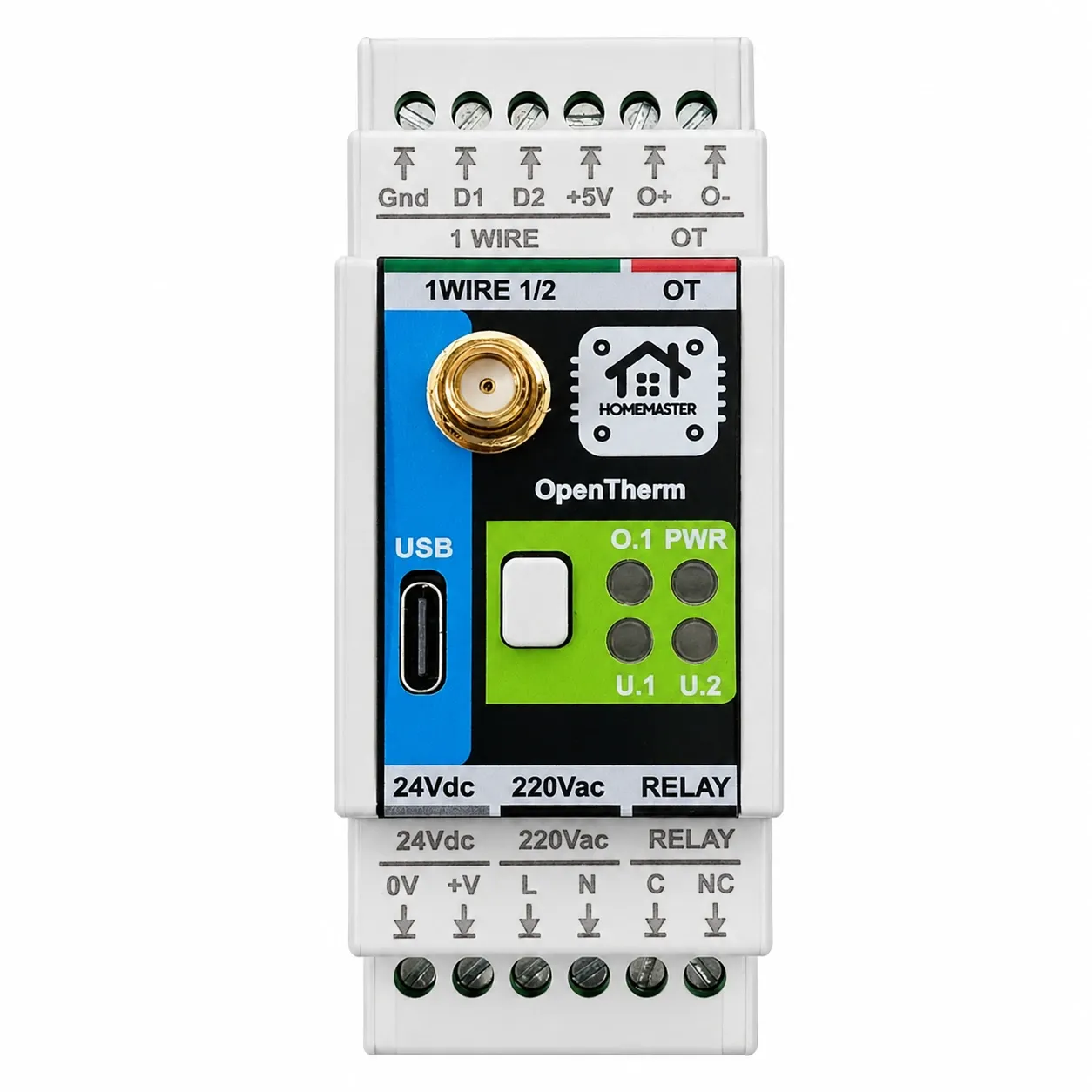
The short version. A conventional thermostat has one sensor, in one room, and it decides for the whole house. Put an OpenTherm master in charge of the boiler instead, the OpenTherm Gateway on the DIN rail or the Thermostat for OpenTherm on the wall, and the boiler can be driven by as many temperatures as you have: probes on the gateway's 1-Wire inputs, an outdoor sensor, or a house temperature that Home Assistant works out from every room. Once the boiler heats for the house, the next step is sharing the heat between rooms: thermal heads on a manifold, the radiator thermostats you already have, or 230 V zone valves on a relay.
1. Why One Thermostat Heats One Room
An ordinary room thermostat measures the air around itself and closes or opens the boiler's thermostat contact. Every other room in the house is invisible to it. That gives the two complaints everyone with one thermostat knows:
- The far rooms stay cold. The room with the thermostat warms up first, the thermostat is satisfied, the boiler stops, and the bedroom at the end of the corridor never gets there.
- The near rooms overheat. Turn the thermostat up to rescue the bedroom and the living room goes to 25 °C.
Moving the thermostat only moves the problem. The issue is not where the sensor is but that there is only one.
2. Put OpenTherm in Charge of the Boiler
With OpenTherm the controller does not switch the boiler on and off; it asks for a flow temperature and the boiler modulates to reach it, reporting back flame, flow and return temperatures and faults. The controller, not a wall box with one sensor, decides what the house needs. The wiring and the two mistakes to avoid are in replacing a cloud thermostat with OpenTherm. One rule from there matters here: one OpenTherm master per boiler, so the gateway or the wall thermostat, not both.
Coming in December: the HomeMaster Thermostat for OpenTherm. An OpenTherm master for the wall with a 2.8″ screen, its own room sensor, humidity and light sensors and a 24 GHz presence radar. The schedule and the weather curve run on the device, any room temperature from Home Assistant can stand in for its own sensor, and the house keeps heating when the server or the internet is down. First units ship in December 2026.
3. Give the Boiler More Than One Temperature
There are two ways to tell the controller how warm the house really is, and they combine.
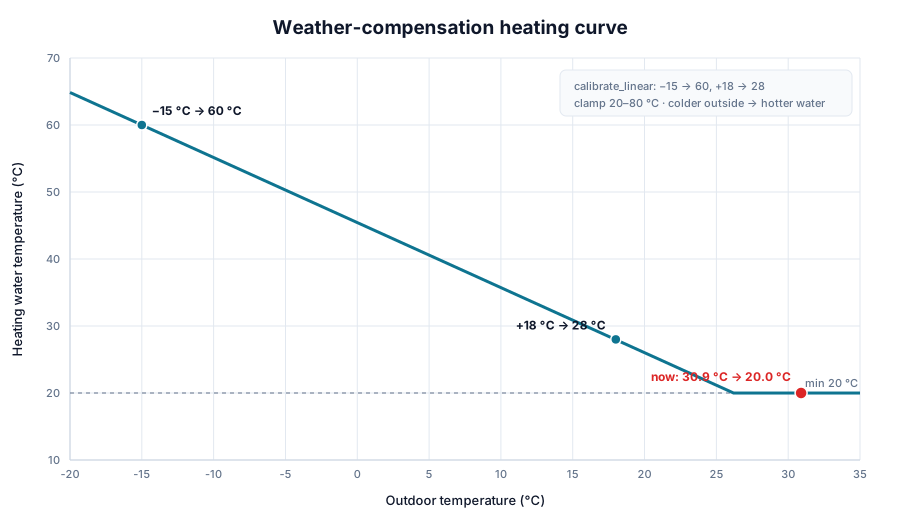
Probes on the gateway. The OpenTherm Gateway has two 1-Wire inputs, and 1-Wire is a bus: several DS18B20 probes can share one cable, each with its own address. Run a probe to each room that matters, put one on the north wall outside, and the gateway has the house and the weather without depending on anything else. The outdoor probe is what weather compensation needs: the colder it is outside, the warmer the water. Weather-compensated heating with the OpenTherm Gateway shows the curve.
A house temperature from Home Assistant. If the rooms already have sensors of any kind, wired or wireless, Home Assistant can turn them into one number for the boiler and send it to the gateway or the wall thermostat as the room temperature. Which number is your choice:
- The coldest room, so the boiler keeps going while any room is below its setpoint.
- The largest shortfall, each room compared with its own setpoint, so a bedroom set to 19 °C and a bathroom set to 23 °C count fairly.
- A weighted average of the rooms that are in use, if you would rather not heat for a spare room.
Keep a fallback on the device. If Home Assistant stops sending, the gateway should go on with its own probes or the weather curve rather than with the last number it was given. What still works when Home Assistant is down covers where each rule should live.
4. Then Share the Heat Between Rooms
Heating for the coldest room has a cost: without anything closing the warm rooms, they get warmer still. The boiler now heats for the house; the valves decide which room gets it. Three ways to do that, depending on what is already installed.
Thermal heads on a manifold (24 V)
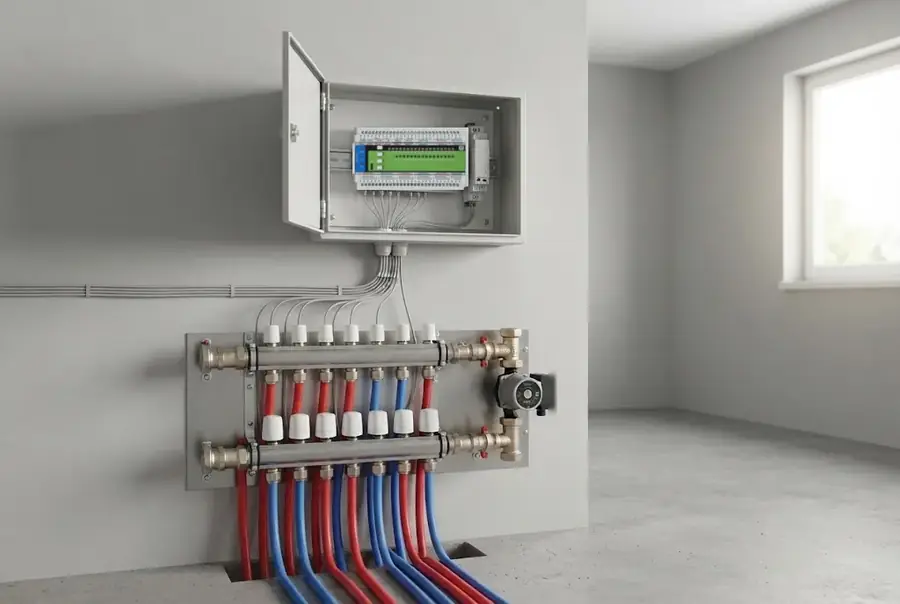
Where the radiators or floor loops come back to a manifold, a 24 V DC thermal head on each outlet turns it into zones. The STR-3221-R1 drives up to 32 heads and runs them on its own: slow on/off cycles, openings spread so the heads do not all start together, valve exercise in summer, a frost fallback if the bus goes quiet. It also raises a heat-demand flag while any zone is open, which the controller can pass to the boiler. Underfloor manifolds work the same way; see underfloor heating zones in Home Assistant.
Radiator thermostats you already have
If the radiators already have smart radiator thermostats, Zigbee or otherwise, Home Assistant can drive them as the zone valves: lower the setpoint in rooms that are warm, raise it in rooms that are behind, and let the boiler follow the house temperature from section 3. Nothing has to be rewired. The trade-off is batteries and a radio link in every room, and a room that loses its link stops balancing until it is back.
230 V zone valves
Many manifolds and older systems have 230 V zone valves or actuators. Those are switched by relays, and several HomeMaster modules have them:
- MiniPLC: six relays on the controller itself.
- DIO-430-R1: three relays on the RS-485 bus, made for pumps, zone valves and diverters.
- WLD-521-R1: two relays, rated 3 A at 250 V AC per contact, so two valves at 230 V or 24 V. The same module watches the plant room for leaks and counts water from a pulse meter, so one module covers the leak shut-off and two heating zones.
Check each valve's current against the relay rating, and fuse the valve circuit; the relay contacts are not a fuse.
5. What Keeps Working When Something Fails
| What fails | Boiler | Room valves |
|---|---|---|
| Home Assistant down | The wall thermostat runs its own schedule and curve; the gateway carries on with its own probes or the weather curve if that logic is on the device | Heads on the STR-3221-R1 keep their last state; radiator thermostats run on their own setpoints |
| Internet down | No change: nothing here uses a cloud | No change |
| Controller or bus down | The OpenTherm master keeps talking to the boiler | STR-3221-R1 switches to its frost cycle after the set time |
6. What This Is Not
Not a ready-made room regulator. How each room's temperature becomes a valve position or a boiler request is configured in Home Assistant or in the controller's ESPHome configuration; HomeMaster provides the hardware and the local fallbacks, not a packaged room control loop.
Not a fix for a missing radiator. If a room has too little radiator for its heat loss, opening its valve longer will not make the radiator bigger.
Not for an on/off boiler's flow temperature. Without OpenTherm the boiler still gets on and off through a relay; the room logic works the same, but the water temperature stays on the boiler's dial.